Sketch to Game Asset Generator: Turn Rough Drawings into Game Art
Use this sketch to game asset generator to convert rough character doodles, prop thumbnails, environment layouts, and UI icon sketches into polished game concept art. Upload a sketch, pick an asset style, and create game-ready visual drafts for characters, creatures, weapons, props, sprites, icons, and level ideas without starting from a blank prompt.
Upload Image
Upload an image file to get started with your AI conversion
Click or drop your image here
Max 5MB
Maximum quality with the best detail and accuracy
Preview
View your AI-transformed result and compare with the original
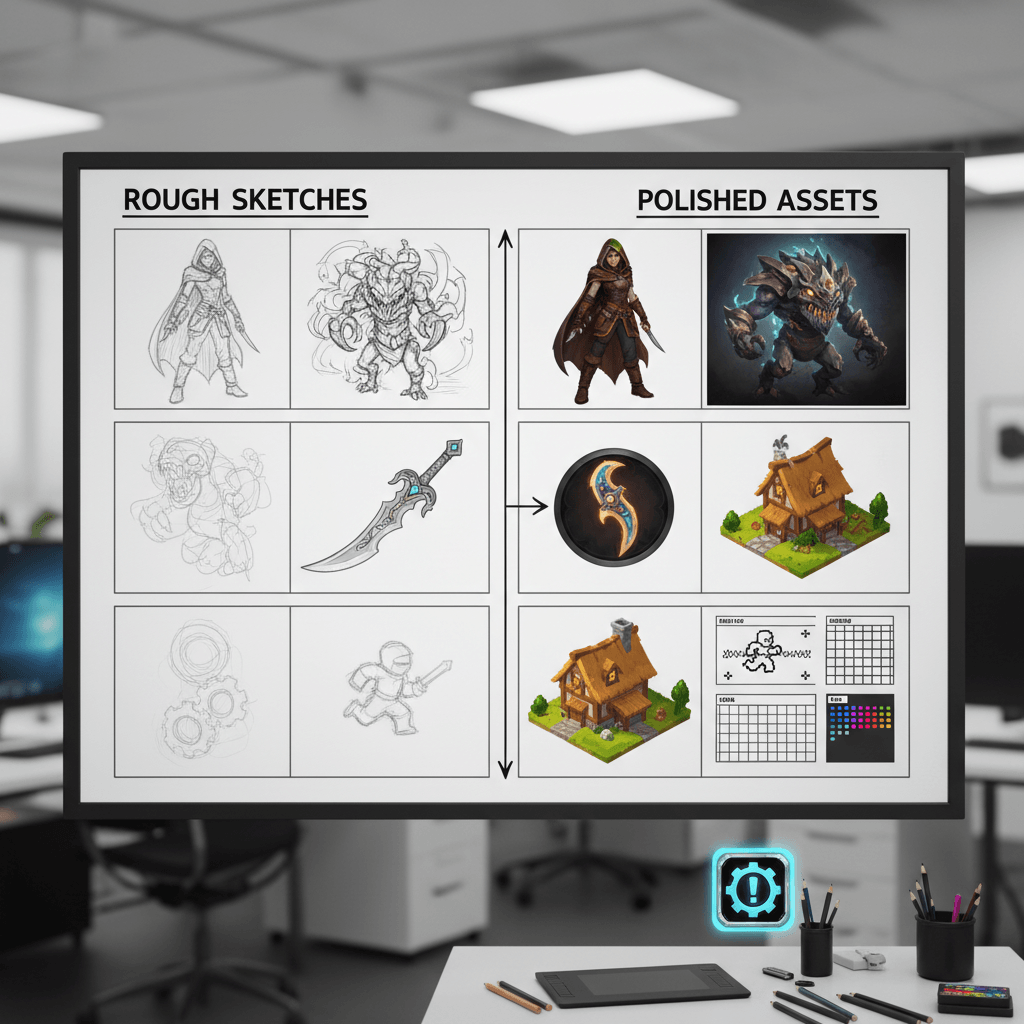
↑ Example result. Try it yourself!
Why Use a Sketch to Game Asset Generator
Move from napkin sketch to production-ready visual direction while keeping your original shapes. This tool is built for game asset generator from sketch workflows, not generic sketch-to-image conversion.
Game-Aware Sketch Interpretation
The sketch to game asset generator reads silhouettes, pose, modular shapes, item handles, costume details, and environment blockouts before rendering. Your rough drawing remains the design foundation instead of being replaced by a generic AI image.
Focused Asset Presets
Choose character concept, creature design, prop item, environment tile, isometric building, weapon asset, pixel sprite, UI icon, or concept sheet. Each preset turns the same sketch into a specific game production direction.
AI Concept Art Generator for Indie Teams
Use the tool as an AI concept art generator for quick pitch frames, sprint planning, art bible exploration, and game jams. It helps small teams visualize asset ideas before spending time on final illustration or 3D modeling.
Sketch to Image for Games
Unlike broad sketch to image tools, this workflow speaks game art language: gameplay readability, strong silhouettes, inventory clarity, modular environments, sprite-friendly shapes, and production handoff references.
Custom Prompt Control
Add genre, camera angle, target platform, art style, material notes, or lore details. The sketch to game asset generator blends your written direction with the uploaded sketch so the final result follows both structure and style.
Fast Asset Iteration
Turn one thumbnail into multiple asset drafts in seconds. Compare character, prop, sprite, and concept sheet versions, then redraw the strongest idea for another pass through the sketch to game asset generator.
What You Can Create with Sketch to Game Asset Generator
Use the tool anywhere a rough game idea needs to become a visual asset draft.

Character and Creature Concepts
Turn rough character poses, mascot doodles, and creature silhouettes into game concept art. The sketch to game asset generator keeps your proportions and pose while adding costume, anatomy, material, and lighting detail.

Indie Game Prototypes
Use the game asset generator from sketch during early prototyping. Convert props, weapons, buildings, environment tiles, and icons into quick art references that make a graybox or pitch deck easier to understand.

Asset Pack and Client Pitches
Freelancers and studios can turn rough asset ideas into polished concept sheets for review. Use sketch to image for games to explore multiple art directions before committing to final production.
How to Generate Game Assets from Sketches
Create a game asset draft from a rough drawing in three quick steps.
- 1
Upload a Rough Sketch
Upload a pencil sketch, digital doodle, concept thumbnail, UI icon draft, or level blockout. Clear silhouettes and readable shapes help the sketch to game asset generator understand the asset idea.
- 2
Choose an Asset Style
Pick a preset such as character concept, prop item, environment tile, pixel sprite, or UI icon. Add custom notes for genre, mood, camera view, materials, or target game style.
- 3
Generate and Refine
Preview the finished concept, download it, or adjust your sketch and prompt for another variation. Use the result as game concept art, a modeling reference, a pitch image, or a prototype asset draft.
Tips for Better Game Asset Results
Design the Silhouette:
Strong silhouettes produce stronger assets. Draw the main outline, pose, readable proportions, and important negative spaces before running the sketch to game asset generator.
Name the Game Context:
Add context like cozy farming sim, roguelike dungeon, sci-fi tactics, fantasy RPG, mobile icon, or pixel platformer. The AI concept art generator can then match the asset to the right production style.
Iterate in Passes:
Start with a rough idea, generate a few directions, then redraw the best result with cleaner structure. A second sketch to image for games pass usually gives clearer assets.
Pricing
Transform your images with AI. Choose the plan that fits your needs.
Basic
Perfect for personal use and casual creators.
Includes
- Own your creations
- Access to Standard Generation
- Image history saved
- Standard Quality Download
Billed annually · Save $24/year
Cancel anytime. No lock-in contract.
Pro
Best Value · 4x MoreFor power users and professionals.
Everything in Basic, plus
- Commercial License Included
- Priority Support
- 4x More Credits
- Priority email support
Billed annually · 75% cheaper per image
Cancel anytime. No lock-in contract.
Built for Game Artists, Designers, and Indie Developers
"I sketch tiny prop thumbnails during design meetings, then run them through the sketch to game asset generator. It gives our artist a clear direction before we spend time on final assets."
"This is more useful than a generic image generator because it keeps the silhouette from my drawing. I use it for creature ideas, weapons, and quick character concepts."
"For game jams, the sketch to game asset generator helps us turn whiteboard drawings into readable art direction fast. The pixel sprite and UI icon presets are especially handy."
"I use it to pitch asset packs. A rough sketch becomes a concept sheet with materials, shapes, and enough polish for clients to understand the direction."
Sketch to Game Asset Generator: Frequently Asked Questions
Everything you need to know about turning sketches into game asset concepts
A sketch to game asset generator is an AI tool that converts rough drawings into polished game art concepts. It uses your sketch as the structure, then adds production-style rendering for characters, props, environments, sprites, icons, weapons, and concept sheets.
Generic sketch to image tools can render many subjects. This page is tuned for game asset workflows, with prompts that emphasize silhouettes, gameplay readability, modular design, inventory icon clarity, asset sheets, and concept art handoff.
Yes. Upload a rough character, creature, prop, environment, or UI sketch, choose a preset, and the AI concept art generator will create a polished draft while preserving the original layout and shape language.
Readable silhouettes, clear poses, strong object outlines, and simple environment blockouts work best. The sketch can be rough, but the sketch to game asset generator performs better when the main shapes and focal areas are easy to read.
The tool is best for concept art, style exploration, asset drafts, pitch images, and production references. You can use outputs as a starting point, but final game assets may still need artist cleanup, animation, sprite slicing, or 3D modeling.
Yes. Sign up to receive free credits and test the sketch to game asset generator with your own drawings. You can explore multiple presets before upgrading for more generations.