Sketch to Landscape AI: Turn Rough Drawings into Complete Scenes
Sketch to Landscape AI turns rough terrain doodles into complete landscape scenes with mountains, rivers, paths, foliage, and atmospheric light. Upload a quick composition sketch, choose a landscape style, and let sketch to landscape AI build shanshui scenery, cinematic valleys, forests, lakes, canyons, and travel-ready backgrounds from your lines.
Upload Image
Upload an image file to get started with your AI conversion
Click or drop your image here
Max 5MB
Maximum quality with the best detail and accuracy
Preview
View your AI-transformed result and compare with the original
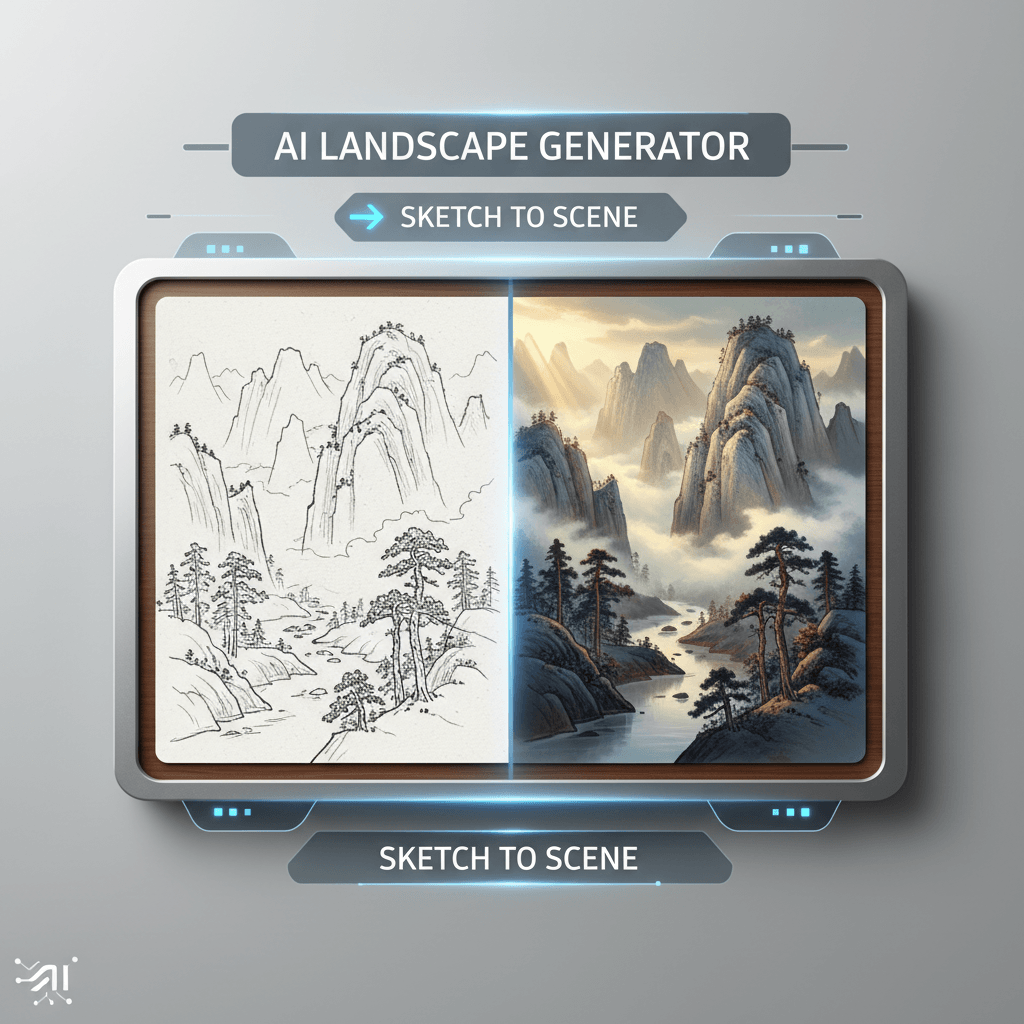
↑ Example result. Try it yourself!
Why Use Sketch to Landscape AI
Move from loose terrain lines to finished scenery without losing your composition. Sketch to Landscape AI is tuned for environment layouts, not generic image prompts.
Landscape-Aware Sketch Conversion
Sketch to Landscape AI reads ridgelines, horizons, paths, water shapes, and foreground blocks before adding detail. Your landscape sketch becomes a complete scene while keeping the original layout.
Shanshui and Procedural Scenery
Create misty shanshui mountains, layered cliffs, river valleys, and procedural-feeling terrain from simple marks. The tool is ideal for the infinite landscape and generative scenery ideas that inspired this page.
9 Focused Landscape Styles
Choose shanshui landscape, misty mountains, cinematic valley, Japanese garden, fantasy forest, watercolor panorama, desert canyon, alpine lake, or tropical island. Each preset guides sketch to landscape AI toward a specific environment result.
Composition Preservation
The default prompt tells the model to preserve the horizon, perspective, main landforms, water paths, and focal shapes. That keeps sketch to landscape AI useful for planning scenes instead of replacing your idea.
Custom Prompt Control
Add your own climate, era, mood, season, architecture, or lighting notes. Sketch to Landscape AI blends your written direction with the uploaded sketch so the final scenery follows both signals.
Fast Free Landscape Iteration
Use free credits to test multiple environment directions quickly. Turn one thumbnail into several landscape options, compare results, then refine the sketch for another sketch to landscape AI pass.
What You Can Create with Sketch to Landscape AI
Use the tool anywhere a rough environment layout needs to become a finished image.

Concept Art and Story Worlds
Artists use sketch to landscape AI to turn thumbnail compositions into finished environment frames. It is useful for shanshui worlds, fantasy forests, valley scenes, and cinematic establishing shots.

Generative Scenery Exploration
Worldbuilders can sketch rivers, ridges, paths, and settlement shapes, then use sketch to landscape AI to explore multiple terrain moods before committing to one direction.

Travel and Social Backgrounds
Creators use sketch to landscape AI to make custom scenic backdrops for thumbnails, banners, posters, and social posts. Draw the scene angle you need, then generate a unique finished landscape.
How to Use Sketch to Landscape AI
Build finished scenery from a rough landscape sketch in three steps.
- 1
Upload a Landscape Sketch
Upload a hand-drawn or digital sketch with the basic scene structure. Clear horizon lines, terrain silhouettes, paths, rivers, and foreground shapes help sketch to landscape AI understand the composition.
- 2
Pick a Landscape Style
Select a preset such as shanshui landscape, cinematic valley, fantasy forest, or alpine lake. You can also add a custom prompt for season, weather, time of day, or architectural details.
- 3
Generate and Refine the Scene
Preview the finished landscape, download the image, or adjust your sketch and prompt for another pass. Sketch to landscape AI works well for fast environment ideation and visual exploration.
Tips for Better Landscape Results
Show the Big Shapes:
Draw the horizon, major ridges, river direction, and foreground blocks clearly. Sketch to Landscape AI performs best when the composition has readable structure.
Use Style Plus Mood:
Choose a preset, then add notes like foggy sunrise, moonlit canyon, spring garden, or stormy coast. The combination gives sketch to landscape AI more precise creative direction.
Iterate Like a Concept Artist:
Start with a loose thumbnail, generate one pass, then redraw the best composition with cleaner shapes. A second sketch to landscape AI pass usually produces stronger scenery.
Pricing
Transform your images with AI. Choose the plan that fits your needs.
Basic
Perfect for personal use and casual creators.
Includes
- Own your creations
- Access to Standard Generation
- Image history saved
- Standard Quality Download
Billed annually · Save $24/year
Cancel anytime. No lock-in contract.
Pro
Best Value · 4x MoreFor power users and professionals.
Everything in Basic, plus
- Commercial License Included
- Priority Support
- 4x More Credits
- Priority email support
Billed annually · 75% cheaper per image
Cancel anytime. No lock-in contract.
Built for Artists, Designers, and Worldbuilders
"Sketch to Landscape AI helps me turn tiny environment thumbnails into polished mood frames. It keeps my path and horizon choices while adding mountains, atmosphere, and light."
"I use sketch to landscape AI for game map ideation. A rough terrain doodle becomes a valley, canyon, or forest scene that the team can discuss immediately."
"The shanshui style is the reason I bookmarked it. Sketch to Landscape AI turns simple mountain contours into misty ink-wash worlds without losing the layout."
"For travel content backgrounds, sketch to landscape AI is faster than searching stock sites. I sketch the coast or lake angle I need and generate a unique scene."
Sketch to Landscape AI: Frequently Asked Questions
Everything you need to know about turning landscape sketches into finished scenery
Sketch to Landscape AI is an online image tool that converts rough landscape sketches into complete scenic images. It reads your composition and renders mountains, rivers, trees, skies, paths, and atmosphere in the style you choose.
General sketch to image tools handle many subjects. Sketch to Landscape AI is focused on environment art and scenery, with presets for shanshui mountains, valleys, gardens, forests, lakes, canyons, and islands.
Yes. The default style is built for shanshui-inspired landscape generation, including misty mountain layers, pine trees, cliffs, rivers, ink-wash texture, and atmospheric negative space.
Use clear lines for the horizon, main ridges, water flow, paths, foreground shapes, and focal objects. Sketch to Landscape AI can handle rough doodles, but cleaner structure gives the model a stronger scene plan.
Yes. You can select a preset style and add custom instructions for weather, season, lighting, architecture, biome, mood, or color palette. Sketch to Landscape AI combines those notes with the uploaded sketch.
Yes. Sign up to receive free credits and test sketch to landscape AI with your own drawings. You can try several presets before upgrading for more landscape generations.