


Type Any Text, Get a Stunning 3D Gold Effect — Free Trial
Skip the Photoshop tutorials. Our AI gold text generator turns your words into realistic metallic gold with beveled edges, light reflections, and depth — ready to download in under 15 seconds. Works for logos, social media graphics, YouTube thumbnails, and event invitations.
Enter Your Text
Type the text you want to transform with AI
0/100
Maximum quality with the best detail and accuracy
Preview
View your AI-transformed result and compare with the original

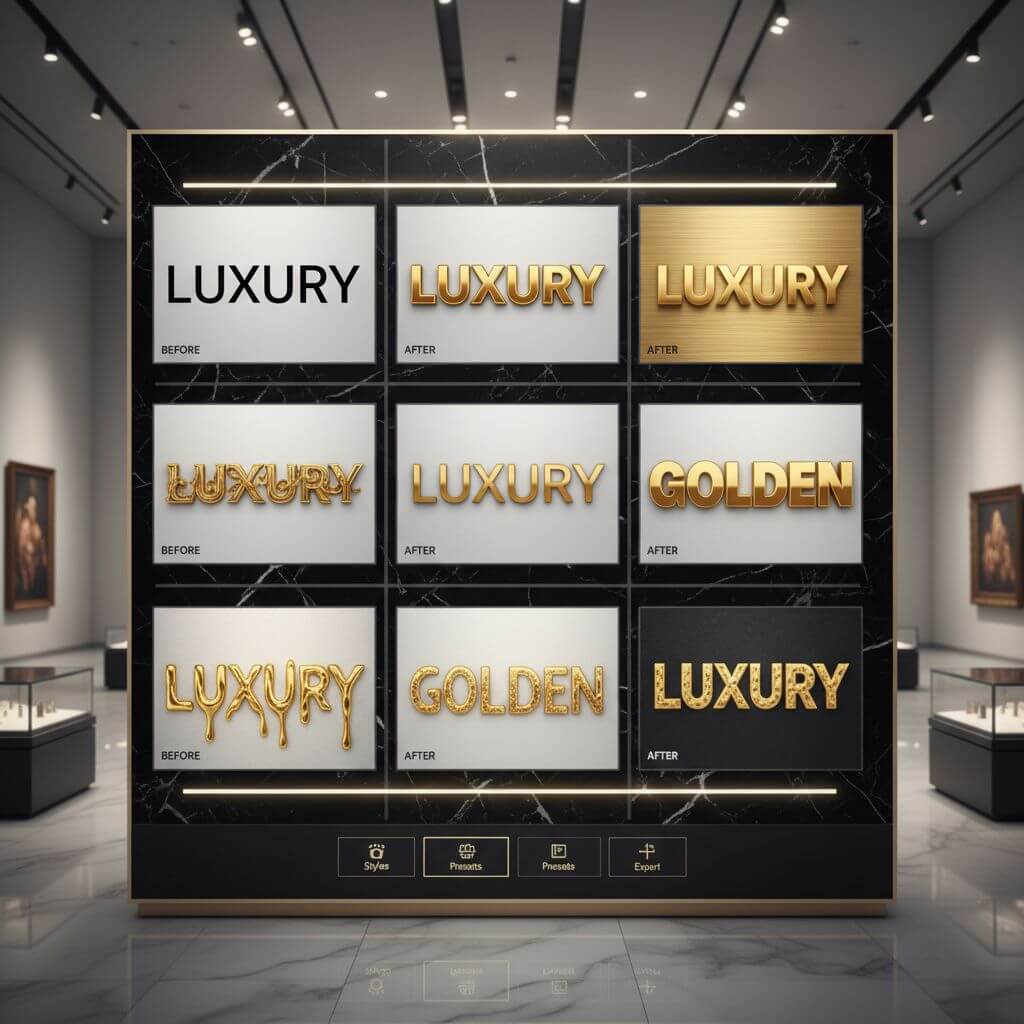
↑ Example result. Try it yourself!
What Makes This Gold Text Generator Different
Not a basic gold overlay. The AI renders actual 3D geometry with metallic reflections, shadow casting, and surface detail that looks like real gold — not a Photoshop filter.
AI-Rendered 3D Metallic Surfaces
The AI builds actual 3D geometry for each letter — beveled edges, embossed depth, and metallic surfaces that catch light realistically. The result looks like a physical gold object, not a flat color overlay.
9 Distinct Gold Styles
Classic polished gold for logos. Rose gold for feminine branding. Brushed gold for modern minimalism. Liquid gold for dynamic effects. Each style has its own reflection pattern, surface texture, and color temperature.
Ready in 10–15 Seconds
Type your text, pick a gold style, and the AI generates a high-resolution render. No layer masks, no blending modes, no tutorials — just a finished gold text effect you can download and use immediately.
Print-Ready Resolution
Output is high-resolution with clean edges, suitable for business cards, banners, merchandise, and large-format prints. The metallic detail holds up at any size without pixelation.
Works for Any Text Length
Single words like "VIP" or "SALE", full brand names, event titles, or short taglines — the AI adjusts composition and lighting automatically based on text length and complexity.
No Design Skills Required
Creating gold text effects in Photoshop requires knowledge of layer styles, gradient maps, and lighting. This tool handles all of that automatically — type, pick a style, download.
What People Make with Gold Text
From luxury logos to party invitations — see how gold text effects are used in real projects.

Logos & Brand Identity
Gold text instantly communicates luxury, quality, and prestige. Jewelry brands, law firms, hotels, and premium products use gold typography in logos, business cards, and packaging. The 3D metallic effect adds depth that flat gold can't match.

Social Media & YouTube Thumbnails
Gold text grabs attention in crowded feeds. Content creators use it for announcement posts, milestone celebrations, quote graphics, and video thumbnails. The metallic shine stands out on both light and dark backgrounds.

Event Invitations & Certificates
Wedding invitations, award certificates, gala event cards, and holiday greetings all benefit from gold text. The effect replicates expensive gold foil printing at a fraction of the cost — download, print, done.
How to Create Gold Text in 3 Steps
No Photoshop, no plugins, no tutorials. Type your text and get a professional gold effect in under a minute.
- 1
Type Your Text
Enter any word, phrase, or brand name. Sign up to get free trial credits — enough to generate multiple gold text effects and test different styles.
- 2
Choose a Gold Style
Pick from 9 metallic styles: classic polished, rose gold, brushed, champagne, liquid gold, and more. Each style produces a different look — try 2-3 to find what fits your project.
- 3
Download & Use
Preview the rendered gold text, then download in high resolution. The output works for logos, social media posts, thumbnails, invitations, certificates, and print materials.
Tips for Better Gold Text Results
Keep Text Short:
Gold effects look best on 1-3 words. Long sentences lose the metallic impact. For taglines, try generating the key word in gold and adding the rest in a normal font.
Match Style to Context:
Polished gold works for luxury branding. Rose gold fits beauty and fashion. Brushed gold suits tech and minimalist designs. Antique bronze gold pairs well with vintage or heritage themes.
Dark Backgrounds Pop:
Gold text stands out most against dark backgrounds — black, navy, deep green. If your design has a light background, try the champagne or white gold platinum style for better contrast.
Pricing
Transform your images with AI. Choose the plan that fits your needs.
Basic
Perfect for personal use and casual creators.
Includes
- Own your creations
- Access to Standard Generation
- Image history saved
- Standard Quality Download
Billed annually · Save $24/year
Cancel anytime. No lock-in contract.
Pro
Best Value · 4x MoreFor power users and professionals.
Everything in Basic, plus
- Commercial License Included
- Priority Support
- 4x More Credits
- Priority email support
Billed annually · 75% cheaper per image
Cancel anytime. No lock-in contract.
What Designers Are Saying
"I used to spend 20 minutes per gold text effect in Photoshop — finding the right gradient, adjusting bevel settings, tweaking the lighting. Now I type the text, pick 'Classic Polished Gold', and it's done. The 3D depth looks better than what I was making manually."
"I make YouTube thumbnails and gold text is a huge engagement booster. This tool lets me test different styles in seconds instead of committing to one in Photoshop. The rose gold style is my go-to for beauty content."
"My client wanted a gold logo for their luxury spa brand. I generated 5 variations in under 2 minutes, presented them, and the client picked one on the spot. Saved me half a day of mockup work."
"I run a small print shop and customers always ask for gold text on invitations and certificates. Instead of explaining why real gold foil is expensive, I show them AI-generated options. 90% of the time they're happy with the digital version."
Frequently Asked Questions
Common questions about creating gold text effects
Type your text, choose one of 9 gold styles (polished, rose gold, brushed, etc.), and the AI renders a 3D metallic text effect with realistic lighting, reflections, and shadows. The output is a high-resolution image ready for download — no Photoshop or design skills needed.
Most gold text effects are ready in 10–15 seconds. Type your text, pick a style, and the result appears almost immediately. You can try multiple styles in under a minute to compare options.
9 styles: Classic Polished Gold, Rose Gold, Antique Bronze Gold, Brushed Gold, Champagne Gold, White Gold Platinum, Gold with Diamonds, Liquid Gold, and Royal Embossed Gold. Each has unique surface textures, reflection patterns, and color temperatures.
New users get free trial credits to generate multiple gold text effects. The trial includes full access to all 9 styles and high-resolution downloads. You can purchase more credits anytime if you need additional renders.
Yes. Gold text effects generated with this tool can be used in logos, marketing materials, merchandise, social media, print products, and any other commercial application without additional licensing.
Output is high-resolution, suitable for both digital use (social media, websites, thumbnails) and print (business cards, banners, invitations). The metallic detail and clean edges hold up at large sizes without quality loss.