
AI Campaign Grid Post Generator: Build Professional Brand Grids in Seconds
Turn your brand logo into a polished 2-column visual identity grid — complete with AI-written slogans, stylized photo blocks, and bold typography. No design skills needed, just upload and go.
Upload Image
Upload an image file to get started with your AI conversion
Click or drop your image here
Max 5MB
Maximum quality with the best detail and accuracy
Preview
View your AI-transformed result and compare with the original

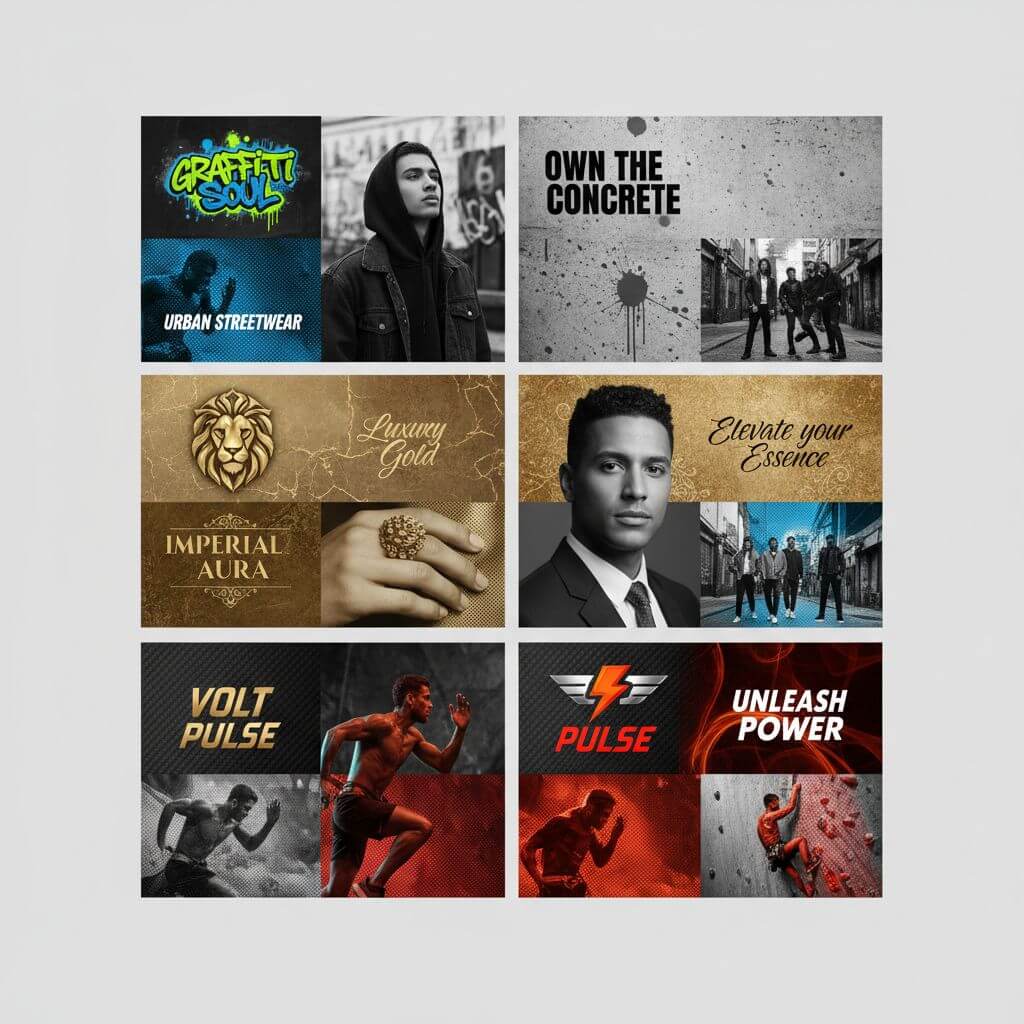
↑ Example result. Try it yourself!
What Makes This Grid Creator Different
Most design tools require you to start from a blank canvas. Our AI analyzes your logo, picks complementary colors, writes slogans, and assembles everything into a cohesive layout automatically.
Logo-Aware Color Extraction
The AI scans your uploaded logo to identify primary and accent colors, then applies them consistently across every block in the grid. This ensures your output looks on-brand without manual color picking — something Canva templates can't do automatically.
AI-Written Slogans That Fit
Instead of placeholder text, the tool generates short motivational taglines tailored to your brand's visual tone. Each slogan is set in bold typography with distressed ink textures, ready for social media without additional editing.
2-Column Layout with Zero-Gap Composition
Every grid uses a full-bleed 2-column structure with no spacing between blocks. The result is a high-density visual that works especially well on Instagram feeds, where each tile displays at 1080x1080px and the full grid creates a seamless mosaic effect.
9 Distinct Visual Styles
Choose from bold red & black, urban streetwear, vintage Americana, minimalist corporate, punk rebellion, luxury gold, sports energy, retro 80s, and eco organic. Each preset adjusts typography, textures, color treatment, and photo effects to match a specific aesthetic.
Halftone Photo Blocks with Duotone Effects
Portrait photo blocks are automatically converted to high-contrast black and white with halftone dots, film grain, and a duotone overlay in your brand colors. This gives every grid a professional screen-print look without Photoshop.
Print-Ready, High-Resolution Output
Generated grids export at high resolution suitable for both digital and print use. Share directly to Instagram, use in pitch decks, or send to a printer — the output holds up at any size.
Real-World Use Cases
See how marketing teams, brand managers, and event organizers use brand grid layouts to create professional campaign visual assets without a design team.

Social Media Marketing Campaigns
Digital marketers create consistent visual content for Instagram, Facebook, and Twitter feeds. Each grid tile displays at 1080x1080px, and the full layout forms a seamless mosaic that boosts profile aesthetics and drives higher engagement rates.

Brand Identity & Product Launches
Brand managers build cohesive launch materials in minutes instead of days. Upload your logo, generate grids in 2-3 styles, and have ready-to-post assets that reinforce brand recognition across every touchpoint — from Instagram Stories to email headers.

Event & Promotional Marketing
Event organizers generate promotional grids for conferences, music festivals, and product drops. The bold visual styles — especially Urban Streetwear and Sports Energy — create eye-catching assets that stand out in crowded social feeds and drive ticket sales.
How to Create Your Campaign Grid in 3 Steps
The entire process takes under 30 seconds — from logo upload to a finished, downloadable grid.
- 1
Upload Your Brand Logo
Drag and drop your logo (PNG, JPG, or JPEG). For best results, use a version with a transparent background so the AI can isolate it cleanly against colored blocks.
- 2
Pick a Visual Style
Browse the 9 preset styles and select one that matches your brand personality. The AI will build a 2-column grid layout with matching typography, textures, and color treatment based on your choice.
- 3
Download Your Grid
Preview the result and download in high resolution. Each output is sized for social media but works for print materials, presentations, and marketing collateral too.
Pro Tips for Better Results
Use a High-Res Logo:
Upload at least 500x500px for crisp logo blocks. Low-resolution files can cause blurry or pixelated output, especially in the larger grid tiles.
Match Style to Audience:
Urban Streetwear and Punk Rebellion work well for Gen Z audiences on Instagram, while Minimalist Corporate and Luxury Gold are better suited for LinkedIn or B2B campaigns.
Generate Multiple Variations:
Try 2-3 different styles with the same logo. Comparing outputs side by side helps you find the best fit faster — and gives you extra assets for A/B testing on social media.
Pricing
Transform your images with AI. Choose the plan that fits your needs.
Basic
Perfect for personal use and casual creators.
Includes
- Own your creations
- Access to Standard Generation
- Image history saved
- Standard Quality Download
Billed annually · Save $24/year
Cancel anytime. No lock-in contract.
Pro
Best Value · 4x MoreFor power users and professionals.
Everything in Basic, plus
- Commercial License Included
- Priority Support
- 4x More Credits
- Priority email support
Billed annually · 75% cheaper per image
Cancel anytime. No lock-in contract.
What Brands Are Saying
"We used to spend $200 per grid layout outsourcing to a freelance designer on Fiverr. Now I upload our logo, pick a style, and have something just as polished in 15 seconds. We've saved over 40 hours this quarter on social media assets alone."
"As a solo founder, I tried Canva Pro templates but they all looked generic. This tool actually reads my logo colors and builds a cohesive layout around them. The AI slogans are surprisingly usable too — I've posted three grids directly without edits."
"Our team runs campaigns across Instagram, Facebook, and TikTok. Having one tool that outputs consistent brand grids in different styles means we can match the visual tone to each platform without redesigning from scratch every time."
"I was paying for Adobe Creative Cloud just to make grid posts for my bakery's Instagram. Switched to this and cancelled my subscription — the output quality is comparable and I don't need to learn Illustrator. Saved me $55/month."
Frequently Asked Questions
Common questions about creating brand visual identity grid posts with our campaign grid tool
It's an AI tool that turns your brand logo into a professional 2-column visual identity grid. The AI extracts your brand colors, generates matching slogans, arranges logo and photo blocks, and applies cohesive styling — all automatically in about 10-15 seconds.
Canva and Adobe require you to manually place elements, pick fonts, and match colors. This tool does all of that automatically by analyzing your logo. You skip the design work entirely and get a finished grid in seconds instead of hours.
There are 9 preset styles: Bold Red & Black, Urban Streetwear, Vintage Americana, Minimalist Corporate, Punk Rebellion, Luxury Gold, Sports Energy, Retro 80s, and Eco Organic. Each one adjusts typography, photo treatment, textures, and color schemes.
Yes, you get free credits when you sign up, enough to generate several grids and test different styles. Paid plans are available if you need higher volume or commercial-scale output.
Upload your logo as PNG, JPG, or JPEG. For best results, use a transparent PNG. Generated grids are exported in high resolution suitable for social media (1080px+ per tile), print materials, and digital ads.
Absolutely. All outputs are yours to use for any purpose — social media posts, paid advertising, print marketing, pitch decks, or client deliverables. There are no licensing restrictions on the generated images.