
AI Image Generation Cost Comparison: What 20 Models Actually Billed
OpenRouter ran one identical prompt through 20 image generation models and recorded what every single call billed: $0.006 at the low end, $0.134 at the high end — a 22x spread for the same 1:1 image. The cheapest model was OpenAI's gpt-image-2; the most expensive was Google's Gemini 3 Pro Image. And the strangest part: you could not have predicted either number from the models' listed prices.
That measurement, published on OpenRouter's blog on September 18, 2026, is the closest thing image generation has to an honest cost comparison. Every model page quotes its price in a different unit — tokens, megapixels, or per image — so reading two price tags side by side tells you almost nothing. Bills, on the other hand, are all in dollars.
This article walks through what the 20 models actually billed, why list prices mislead, which settings quietly multiply your costs, and how to turn the numbers into a model choice that fits your budget.
Key takeaways
- The same default-settings image billed $0.006–$0.134 across 20 models — a 22x spread (measured September 11, 2026).
- Image models are sold in three incompatible units: per token, per megapixel, and per image. Listed prices are not comparable; billed
usage.costis. - On OpenAI models, the quality setting moved one image from $0.006 to $0.211 — a 35x jump inside one model, bigger than the entire 22x spread between models.
- Five of six models tested rendered a two-line product label correctly. Text in images is closer to a solved problem than a premium feature.
- The top-rated model on Design Arena billed $0.064 per image; the lowest-rated one billed $0.014. Neither ratings nor price predicted output — only running your own prompt did.
What each model actually billed
The test was simple and reproducible: one prompt — "A studio packshot of a glass bottle, hard key light, no text." — sent to 20 of the 52 image models OpenRouter routes, at a 1:1 aspect ratio with no other settings. Then the usage.cost field from each response, which is the amount actually charged, written down for every model. Here is the full table, sorted by cost.
| Model | Billed | Returned | Billing unit |
|---|---|---|---|
| openai/gpt-image-2 | $0.0060 | 1024x1024 PNG | token |
| black-forest-labs/flux.2-klein-4b | $0.0140 | 1024x1024 JPEG | megapixel |
| sourceful/riverflow-v2.5-fast | $0.0176 | 1024x1024 WebP | image |
| black-forest-labs/flux.2-pro | $0.0300 | 1024x1024 JPEG | megapixel |
| qwen/qwen-image-3 | $0.0300 | 1024x1024 PNG | image |
| krea/krea-2-medium | $0.0300 | 1024x1024 PNG | not published |
| openai/gpt-image-1-mini | $0.0333 | 1024x1024 PNG | token |
| google/gemini-3.1-flash-lite-image | $0.0336 | 1024x1024 JPEG | token |
| recraft/recraft-v4.1 | $0.0350 | 1024x1024 WebP | image |
| bytedance-seed/seedream-5-0-lite | $0.0350 | 2048x2048 JPEG | image |
| microsoft/mai-image-2.5 | $0.0482 | 1024x1024 PNG | token |
| black-forest-labs/flux.2-flex | $0.0500 | 1024x1024 JPEG | megapixel |
| x-ai/grok-imagine-image-quality | $0.0500 | 1024x1024 JPEG | image |
| x-ai/grok-imagine-image-2.0 | $0.0600 | 1024x1024 JPEG | image |
| sourceful/riverflow-v2.5-pro | $0.0641 | 1024x1024 WebP | image |
| google/gemini-3.1-flash-image | $0.0672 | 1024x1024 PNG | token |
| black-forest-labs/flux.2-max | $0.0700 | 1024x1024 JPEG | megapixel |
| recraft/recraft-v4.1-vector | $0.0800 | SVG | image |
| bytedance-seed/seedream-5-0-pro | $0.0900 | 2048x2048 JPEG | image |
| google/gemini-3-pro-image | $0.1344 | 1024x1024 PNG | token |
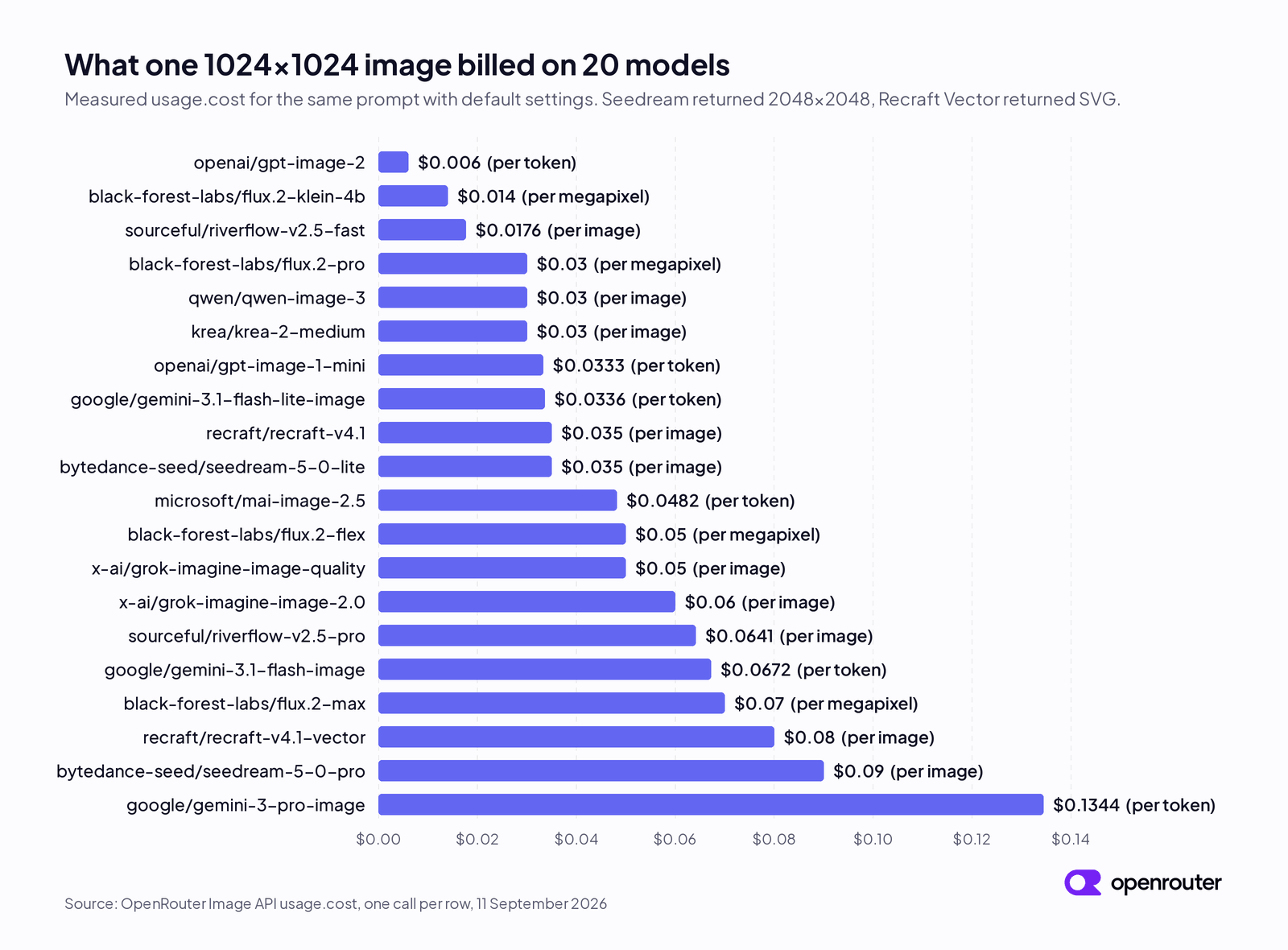
OpenRouter's sorted cost chart: the three billing units mix all the way up the range. Source: OpenRouter blog, "Image Generation Models Compared" (Sept 18, 2026).
Notice what the billing-unit column does: it mixes all the way up the range. A per-image model can be cheap; a per-token model can be expensive. The unit tells you nothing about where a model lands.
Two practical footnotes before you budget from this table. First, single calls vary slightly: two identical riverflow-v2.5-fast requests billed $0.017623 and $0.017639, so average a few runs rather than trusting one. Second, these numbers have a short shelf life — the source itself says to treat any figure older than a month as a hint rather than a budget line. Both Seedream models also returned 2048x2048 by default, which matters more than it looks (more on that below).
Why list prices mislead: three billing units
Image models are sold like three different products:
- Per token — OpenAI, Gemini, and Microsoft MAI models. Your image and your prompt both become tokens on the bill.
- Per megapixel — FLUX.2 models. Bigger frames cost proportionally more pixels.
- Per image — Grok, Recraft, Riverflow, Qwen, and Seedream. A flat rate that changes with the quality and resolution you request.
Each model page is correct in its own unit. But a $0.06-per-megapixel rate and a $0.06-per-image rate are not the same price, and no amount of arithmetic on the two model pages will tell you which one bills less for your image. That is why an AI image generation cost comparison built from listed prices is broken at the source.
Listed rates can even disagree with reality in the same unit. On the day of the test, Riverflow v2.5 Pro listed $0.13 per image and actually billed $0.064. FLUX.2 Flex listed $0.06 per megapixel and billed $0.05 for a one-megapixel image. Krea 2 Medium published no pricing record at all and billed $0.03. Only FLUX.2 Max matched its list price exactly. The response is what you pay; the page is a planning number.
Settings move the bill more than the model
Here is the number that should change how you budget: on gpt-image-2, the quality setting alone moved the same 1024x1024 image from $0.006 (unset or low — they billed identically) to $0.211 at high quality. That is a 35x multiplier inside one model — bigger than the entire 22x spread between the cheapest and most expensive models in the table. The high-quality call also took 123 seconds to return, against 12 seconds at default.
| Quality | Image tokens | Billed |
|---|---|---|
| unset | 196 | $0.00599 |
| low | 196 | $0.00599 |
| high | 7,024 | $0.21083 |
The lesson generalizes: defaults are a pricing decision. A few defaults worth checking before you generate at volume:
- Prompt length bills on per-token models — gpt-image-2 charged $0.006 for a one-line prompt and $0.0135 for a longer product prompt.
- Aspect ratio bills less than pixel count suggests on per-megapixel models: FLUX.2 Klein charged $0.014 for a 1.05-megapixel square and just $0.016 for a 2.46-megapixel 21:9 crop.
- Default resolution can double your rate: Seedream 5.0 Pro accepts 1K input but its default call returned 2K and billed the $0.09 high-resolution rate instead of the $0.045 base rate. Seedream 5.0 Lite lists 2K as its minimum — which delivers four megapixels for $0.035, cheap per pixel but not if you assumed a small image.
What the extra money actually buys
A cost comparison is only useful if price predicts quality. OpenRouter ran three checks.
Text inside images. The test prompt asked for a matte black coffee bag with a two-line label — "OPENROUTER ROASTERS / SINGLE ORIGIN" — because readable words are easy to grade. Five of the six models tested printed both lines correctly. The only failure was the cheapest-tier FLUX.2 Klein, which misspelled the second line as "SINGLE ORISION."
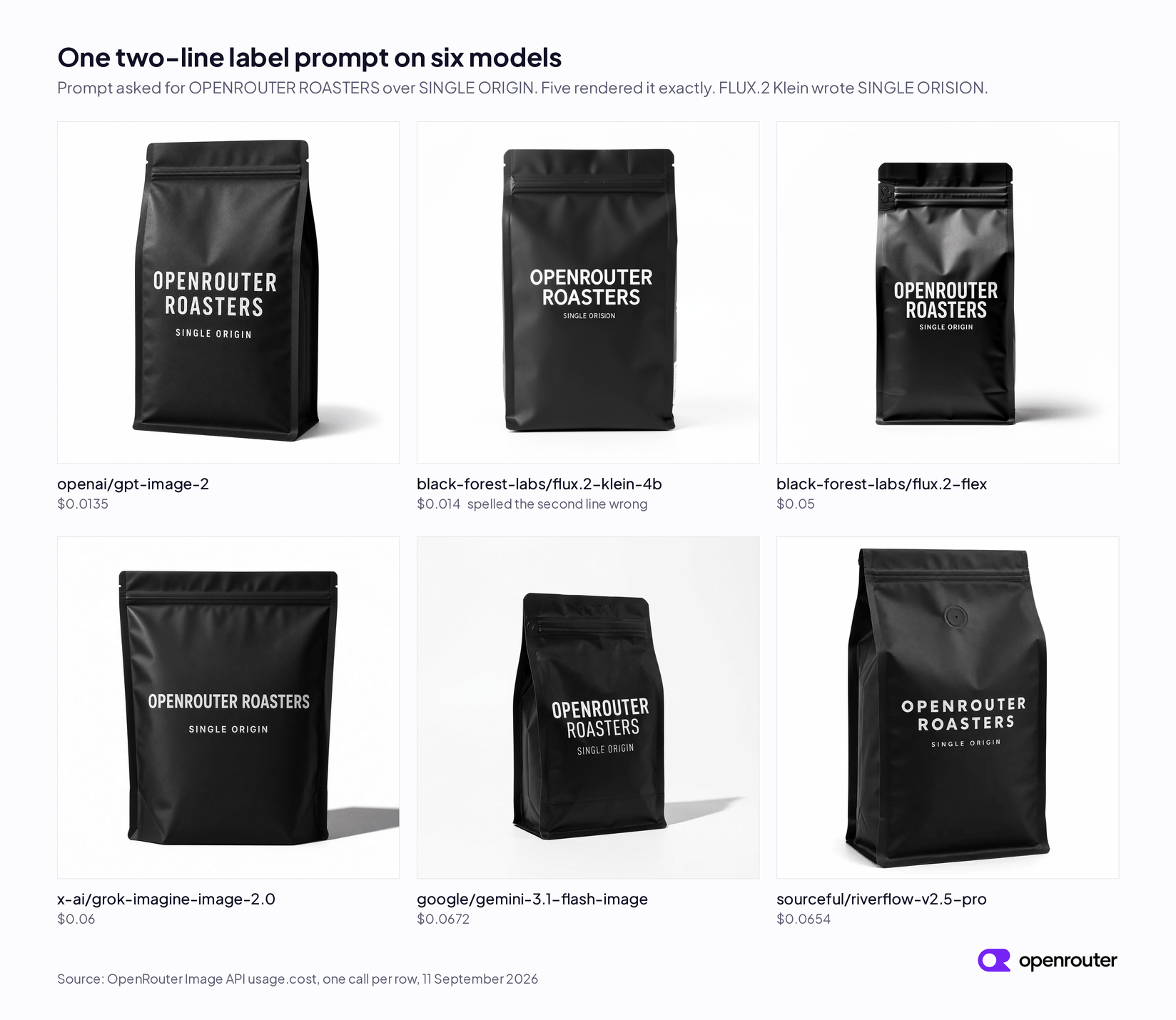
Five of six models printed the two-line label correctly; only FLUX.2 Klein misspelled it. Source: OpenRouter blog, "Image Generation Models Compared" (Sept 18, 2026).
The sharpest comparison: on this longer prompt, gpt-image-2 billed $0.0135 and Riverflow v2.5 Pro billed $0.0654 — roughly 5x more — and both produced a correct, usable packshot. The premium bought a different look, not better text. (Riverflow is not overpriced: it leads the Design Arena image and image-editing boards, and the gap may show on harder compositions. It just means neither the leaderboard nor the price column predicted this result.)
Editing an existing image. All four models tested — gpt-image-2, FLUX.2 Pro, Gemini 3 Pro Image, and Riverflow v2.5 Pro — kept the label's wording and typeface while swapping the background, and none reproduced the source image exactly. Editing bills a little more than generating on every model, but for different reasons: FLUX.2 Pro charged $0.045 versus $0.030 to generate, because the reference image was counted as 4,096 input tokens; Riverflow Pro added 18%; the gaps on gpt-image-2 and Gemini 3 Pro Image stayed under 7%. These are single runs — read the small gaps as approximate.
A reply with both picture and text. Only nine of the 52 catalog models can return text alongside an image (the Gemini image models and OpenAI's gpt-5-image models). Reliability varied wildly in the test:
| Model | Replies with text | Cost per call |
|---|---|---|
| google/gemini-3-pro-image | 3 of 3 | $0.138–$0.140 |
| openai/gpt-5-image | 2 of 3 | $0.20–$0.28 |
| google/gemini-3.1-flash-image | 1 of 4 | $0.067 |
| google/gemini-3.1-flash-lite-image | 0 of 2 | $0.034 |
If the written explanation is optional, the cheaper Gemini models work and you handle the misses. If your product breaks without the text, Gemini 3 Pro Image was the only model that answered with text every single time.
Pick by job
Twenty price points are useless without a decision rule. Pick the model on whichever constraint is tightest:
High volume, ordinary prompts. Start with gpt-image-2 ($0.006–$0.0135 depending on prompt length) — cheapest in the test, and it rendered text correctly for the least money. FLUX.2 Klein at $0.014 is the other budget option, with one measured catch: it was the only model that misspelled the label, so keep it away from frames where a product name must come out right. On the longer coffee-bag prompt the two billed $0.0135 against $0.014 — about $5 apart across ten thousand images. Even at the cheap one-line rate the whole gap is roughly $80. Run both on your own prompts and let output decide.
Words inside the picture. Packaging, UI mockups, and posters fail when a product name garbles. Five of six models handled a two-line label unassisted, so filter on cost and style — then check the result against your words. FLUX.2 Flex rendered the label correctly at $0.05; gpt-image-2 did the same job for about a quarter of that. For logos and labels that must scale and stay editable, recraft-v4.1-vector returns SVG at $0.08 — a file you can open in a design tool, not a sharper raster.
Reference-consistent brand work. If the same product must look identical across a campaign, reference-image limits rule models out before price matters: OpenAI models accept 16 reference images, Gemini 3.x and Seedream 5.0 accept 14, Riverflow Pro takes 10, FLUX.2 Flex/Pro/Max take 8, Grok caps at 3, and Recraft, Krea, and MAI accept 1. A six-image brand kit already eliminates four of those families. Among the survivors, the measured edits ran from about $0.014 (gpt-image-2) through FLUX.2 Pro at $0.045 and Riverflow Pro at $0.076 up to about $0.136 (Gemini 3 Pro Image).
A reply with text and image. Gemini 3 Pro Image at about $0.139 per call was the only model that delivered both every time.
If this is starting to sound like a part-time engineering job — comparing billing units, watching quality tiers, re-pulling endpoint pricing — that is one reasonable takeaway. The other is to let a platform absorb it: SketchTo runs on credits, shows the cost of a generation before you spend anything, and turns per-model billing into a single balance.
Run your own comparison
The best part of this dataset is that the method is copyable, and it takes one API call per model. Generate and editing share one endpoint — POST /api/v1/images — requiring only a model and a prompt; editing adds an input_references array with your source image. The response carries the image and its cost together:
{
  "data": [
    { "b64_json": "<base64>", "media_type": "image/jpeg" }
  ],
  "usage": {
    "total_tokens": 4112,
    "cost": 0.014
  }
}
Read usage.cost, not the model page. Two caveats from the test: seed does not exist on Gemini, Grok, OpenAI, Riverflow, Recraft, or MAI models, so those outputs are not reproducible byte for byte (FLUX.2 Klein, which does support seeds, reproduced an image exactly across two identical calls); and a completed request is billed in full while failed ones cost nothing. Current accepted parameters and per-model pricing are re-pullable anytime via GET /api/v1/images/models.
The bill is the budget
The 22x spread between the cheapest and most expensive image models looks like a ranking. It is not. It is twenty different answers to twenty different jobs, priced in three incompatible units, filtered through settings that can swing any single bill by 35x.
So the working method for an AI image generation cost comparison in 2026 is short: shortlist by job, then generate one image with each candidate and read usage.cost. The model pages estimate; only the response knows. And once you know your real per-image cost, volume math gets honest — $0.006 against $0.134 is $6 against $134 for a thousand images, which is the difference between a rounding error and a line item.
Transform Your Images with AI
Turn sketches into stunning images, remove backgrounds, swap faces, and more — all powered by AI.
Try Sketch To FreeShare
SketchTo Team
Tech writer covering AI tools, image processing, and creative workflows.
Related Articles

Unlimited OCR 2: Performance, Local Deployment, and How It Compares
Baidu's open-source Unlimited OCR 2 parses hundred-page PDFs in one request: self-reported benchmarks, real local deployment requirements, and honest comparisons.
MOSS-Image: OpenMOSS's Open-Source Image Model Built for Text and Layout Control
MOSS-Image is OpenMOSS's open-source text-to-image model for accurate in-image text and JSON layout control. What it is, how it differs from other models, and three ways to try it.
Qwen-Image-2.1: One 7B Open-Weight Model for Image Generation, Editing, and Transparent Assets
Qwen-Image-2.1 unifies text-to-image, editing, and native RGBA transparency in one 7B open-weight model. What it does, what's new, how to run it today — and the license limits before you adopt it.