
FLUX 3 Multi-Image Reference: How Up to 10 References Become One Scene
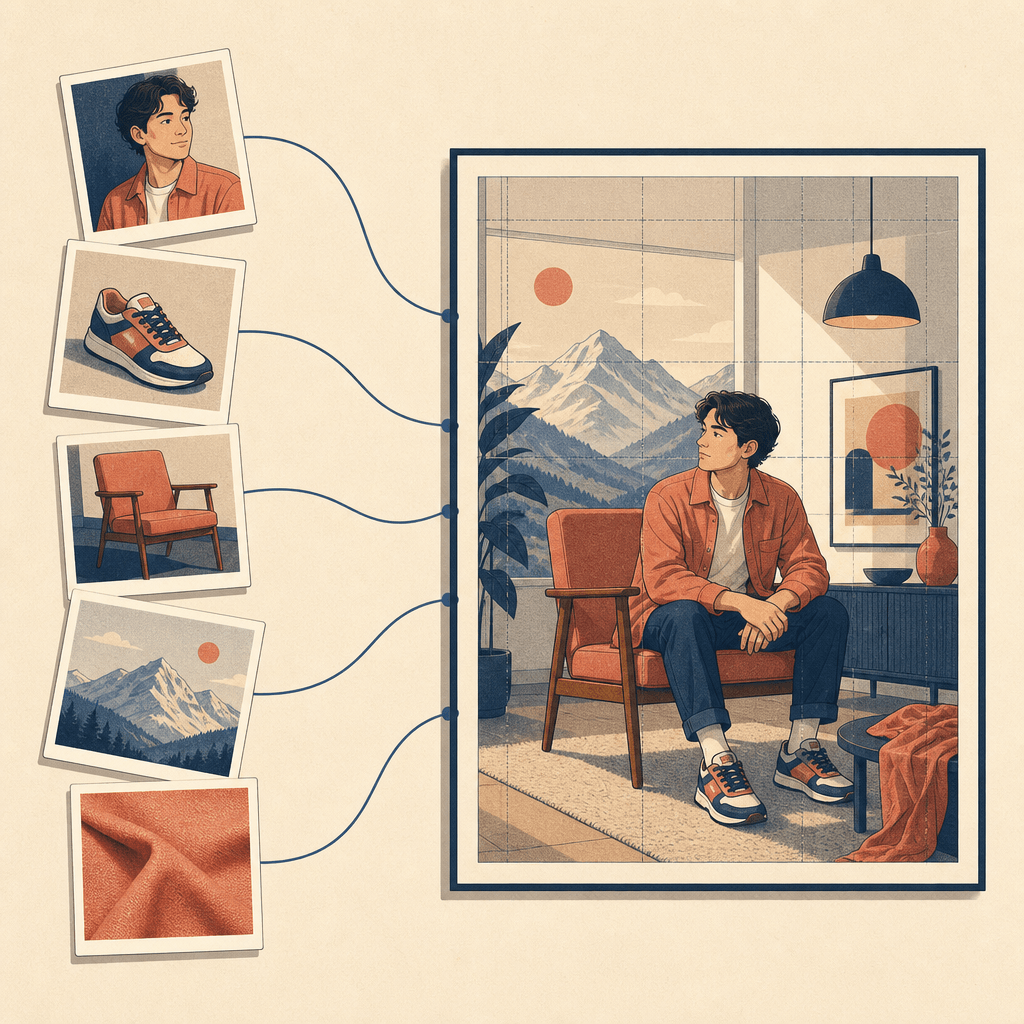
FLUX 3 Image accepts up to 10 reference images and a single text prompt, then renders one scene that keeps people, products, and styles consistent across all of them. Each upload gets a token — ref_image_0, ref_image_1, and so on — and your prompt describes the scene by citing those tokens. The model decides where everything goes. If you want to control placement yourself, FLUX 3 Image also takes bounding-box element tables that pin each element to a spot on the canvas.
The capability went live on Black Forest Labs' API and Playground, and appeared on OpenRouter, on October 1, 2026 — the third slice of the FLUX 3 family BFL announced on July 23, 2026. One correction to the hot takes circulating since launch: accepting many reference images is not new. FLUX.2 already referenced up to 10 images simultaneously. What FLUX 3 Image adds is spatial control — bounding boxes, native 4K output, and an agent-friendly structure where edits touch only the boxes you name.
Key takeaways
- FLUX 3 Image combines 1–10 reference images with one prompt; the API caps each reference between 256×256 px and 16 MP.
- References are cited by
ref_image_Ntokens in a single prompt; the model decides placement and size unless you provide boxes. - Bounding boxes use a 0–1000 grid, written as
[top, left, bottom, right], in a JSON element table appended to the prompt. - Multi-reference input itself shipped with FLUX.2; FLUX 3 Image's new ground is explicit layout control, 4K rendering, and per-box edits that leave surrounding pixels alone.
- Generation costs from $0.041 to $0.607 per image depending on resolution, with the same price on the API and the Playground.
Where FLUX 3 Image fits in the FLUX 3 family
FLUX 3 is not just an image model. Black Forest Labs announced it on July 23, 2026 as a multimodal foundation model trained jointly on images, video, and audio, and it is rolling out in pieces: FLUX 3 Video entered early access first, FLUX 3 Action (a 7B open-weights action model for robotics) was introduced on September 23, and FLUX 3 Image — the part that generates and edits pictures — reached public availability on October 1, 2026, when it appeared on OpenRouter alongside BFL's own Playground and API.
Within the family, FLUX 3 Image handles two jobs: generating new images from text, and editing or combining existing images by sending them as references. Both jobs share the same endpoint, POST https://api.bfl.ai/v1/flux-3-image, where only the prompt field is required.
How multi-reference composition works
The images parameter takes 1 to 10 references, either as URLs or base64 strings, each between 256×256 pixels and 16 megapixels. References receive tokens in the order you add them, starting at ref_image_0.
Your prompt then does two things in one line: describes the scene and cites each token. The official docs show patterns like:
Portrait in Times Square with ref_image_0, ref_image_1, ref_image_2,
ref_image_3, ref_image_4 and ref_image_5.
A house for the chickens from ref_image_0: ref_image_1 walls...
When no boxes are given, FLUX 3 decides where each reference sits and how large it becomes. The aspect_ratio parameter defaults to auto, which keeps the shape of the first reference rather than defaulting to a square — useful when the first upload defines the frame you want.
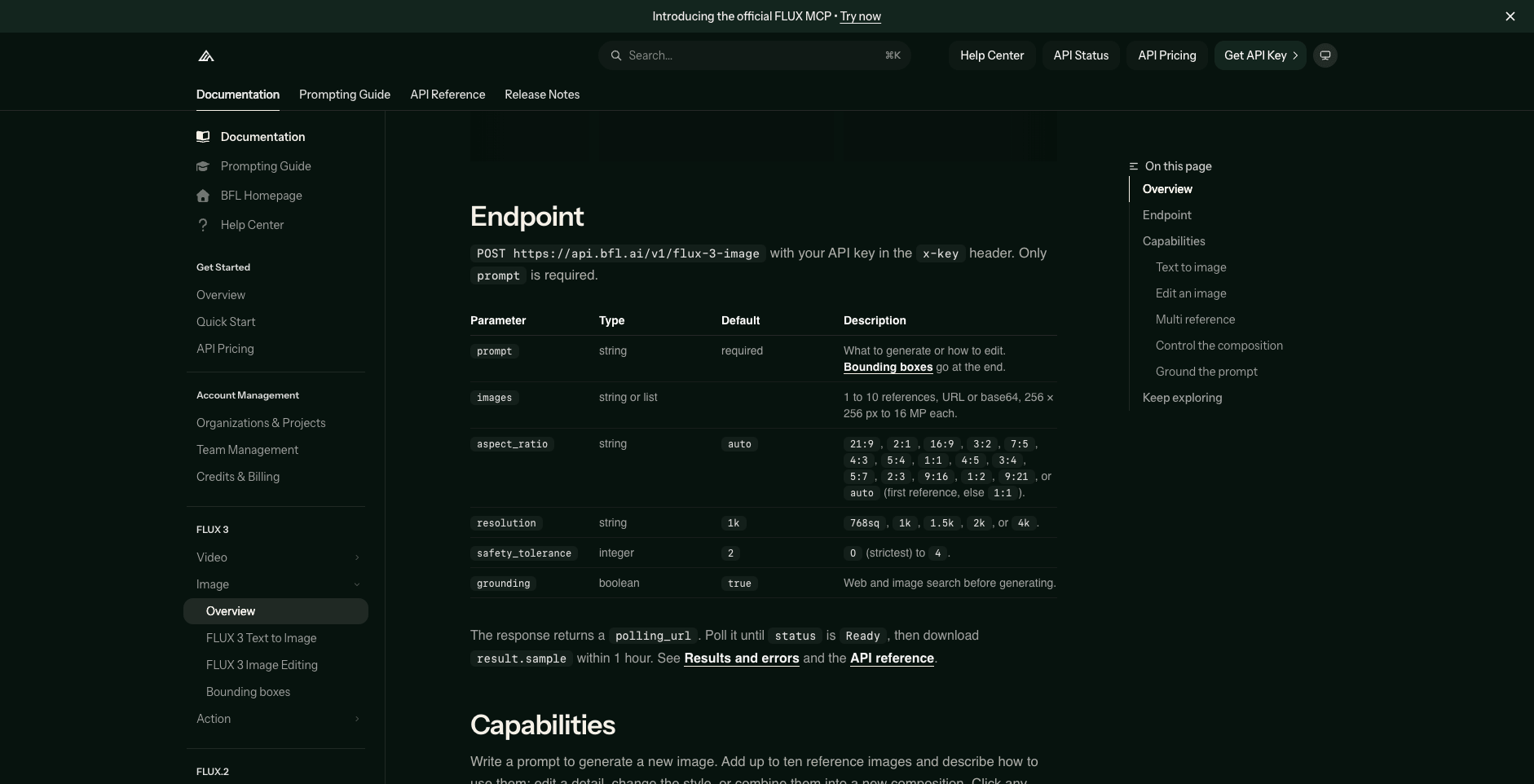
The FLUX 3 Image endpoint parameters in Black Forest Labs' official documentation (accessed Oct 3, 2026).
Bounding boxes when placement matters
Prompt-only citation is fast, but it leaves composition to the model. FLUX 3 Image's answer is an element table: you name each element with an <id> in the prompt, then append a JSON array describing where it goes.
Every box is [top, left, bottom, right] on a 0–1000 grid, regardless of output resolution — [0, 0, 500, 500] is the top-left quarter. A generation prompt pairs a description with the table:
Minimalist graphic illustration featuring a black silhouette of a person
<silhouette_1> centered against a solid, vibrant chartreuse background
<background_1>.

[{"id": "background_1", "bbox": [0, 0, 1000, 1000], "desc": "A flat field
of neon yellow-green with a subtle paper texture."},
 {"id": "silhouette_1", "bbox": [150, 150, 850, 850], "desc": "A black
silhouette of a person in mid-stride."}]
Editing rows add two fields: from names the reference (such as ref_image_0) and src_bbox says where the element is now, while tgt_bbox says where it should end up. Keep a row's boxes identical and the element stays put; change tgt_bbox to move it; set from and src_bbox to null to generate something new in a box; set tgt_bbox to null to remove an element and fill in what was behind it.
Two documented behaviors matter for expectations. First, "boxes guide placement; they are not clipping masks" — content can breathe slightly beyond a boundary. Second, a prompt upsampler expands your short request into the dense caption the model was trained on, but boxes you draw reach the model verbatim. BFL also reports that pixels outside the boxes you edit usually stay identical, which is what makes multi-round edits hold together.
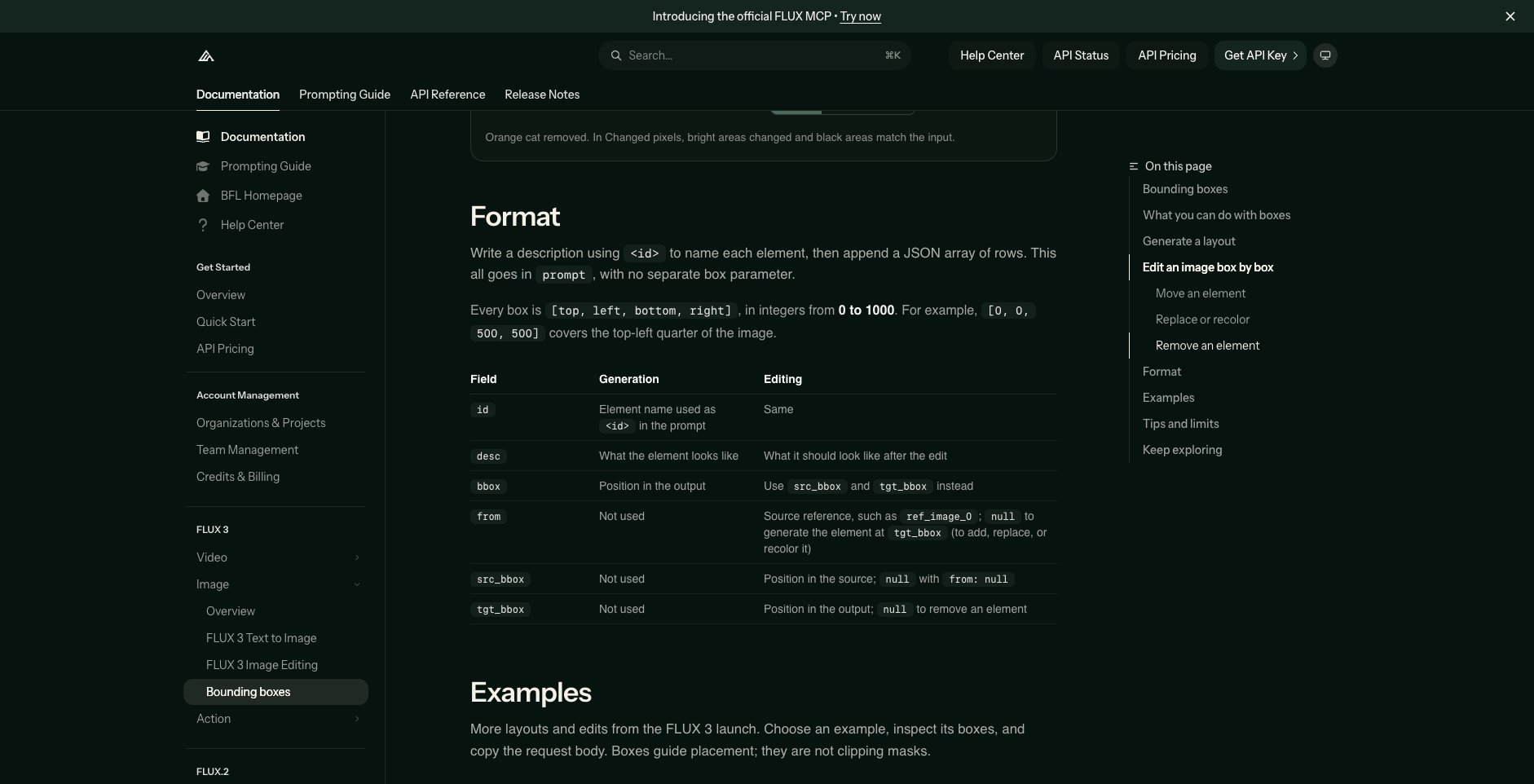
The element-table format from BFL's bounding-box documentation (accessed Oct 3, 2026).
What is actually new: FLUX 3 Image versus FLUX.2 and FLUX.1 Kontext
Because "10 reference images" is the headline number, it is worth being precise about lineage:
| FLUX.1 Kontext (legacy) | FLUX.2 | FLUX 3 Image | |
|---|---|---|---|
| Reference images | One input_image |
Up to 10 simultaneously | 1–10 via images |
| Per-reference size | — | — | 256×256 px to 16 MP |
| Spatial control | Acknowledges annotation boxes in the input | JSON-based control, pose guidance | Element tables with [top, left, bottom, right] boxes on a 0–1000 grid |
| Max output | — | ~4 MP | 4k tier (~16 MP, native 4K) |
| Edit model | Whole-image instruction edits | Multi-reference editing | Per-box edits; untouched pixels usually identical |
BFL's own docs point FLUX.1 Kontext users to newer models, describing FLUX.2 as the step that introduced multi-reference support with up to 4MP output. So if you were composing scenes from several references in late 2025, FLUX.2 could already do that part. The FLUX 3 Image delta is control and scale: explicit layout boxes for every element, resolution up to about 16 megapixels, a grounding option (on by default) that lets the model consult web and image search before generating, and a structure — named elements, verbatim boxes, per-box edits — aimed at agents that compose images programmatically.
Plain references or boxes: picking the right mode
The two modes solve different problems, and the docs support using both in one request:
- Plain multi-reference (tokens only) fits consistency tasks where composition is flexible: putting a character from
ref_image_0in a new scene with the outfit fromref_image_1, or blending style references. You describe the scene; the model handles layout. - Element tables fit tasks where position is the requirement: a poster where the headline belongs in the top third, a product shot where the item must sit in a specific region, a panel grid where each cell has defined content. Typical production cases BFL demonstrates include type set around a photograph, collages, editorial spreads, and crowded scenes where every element has a place.
- Mixed requests treat references as element sources: cite
ref_image_0in thefromfield of a row, then place that element withtgt_bbox.
What it costs and where to run it
FLUX 3 Image pricing is per image, by resolution: $0.041 at 768×768, $0.048 at about 1 MP, $0.100 at about 4 MP, and $0.607 at the 4k tier (about 16 MP). One API credit equals $0.01, and the Playground charges the same as the API. Each request's response includes its computed cost, and results stay downloadable for one hour after the job reports Ready.
Access today is through BFL's Playground and API, plus aggregator platforms — OpenRouter listed FLUX 3 with the 10-reference capability on launch day, October 1, 2026. For companies that want to self-host, BFL offers FLUX 3 Image under a commercial weights license, and its published launch plan includes open-weight access to a FLUX 3 multimodal backbone ("FLUX 3 Dev") — a plan, not a shipped download, as of early October 2026.
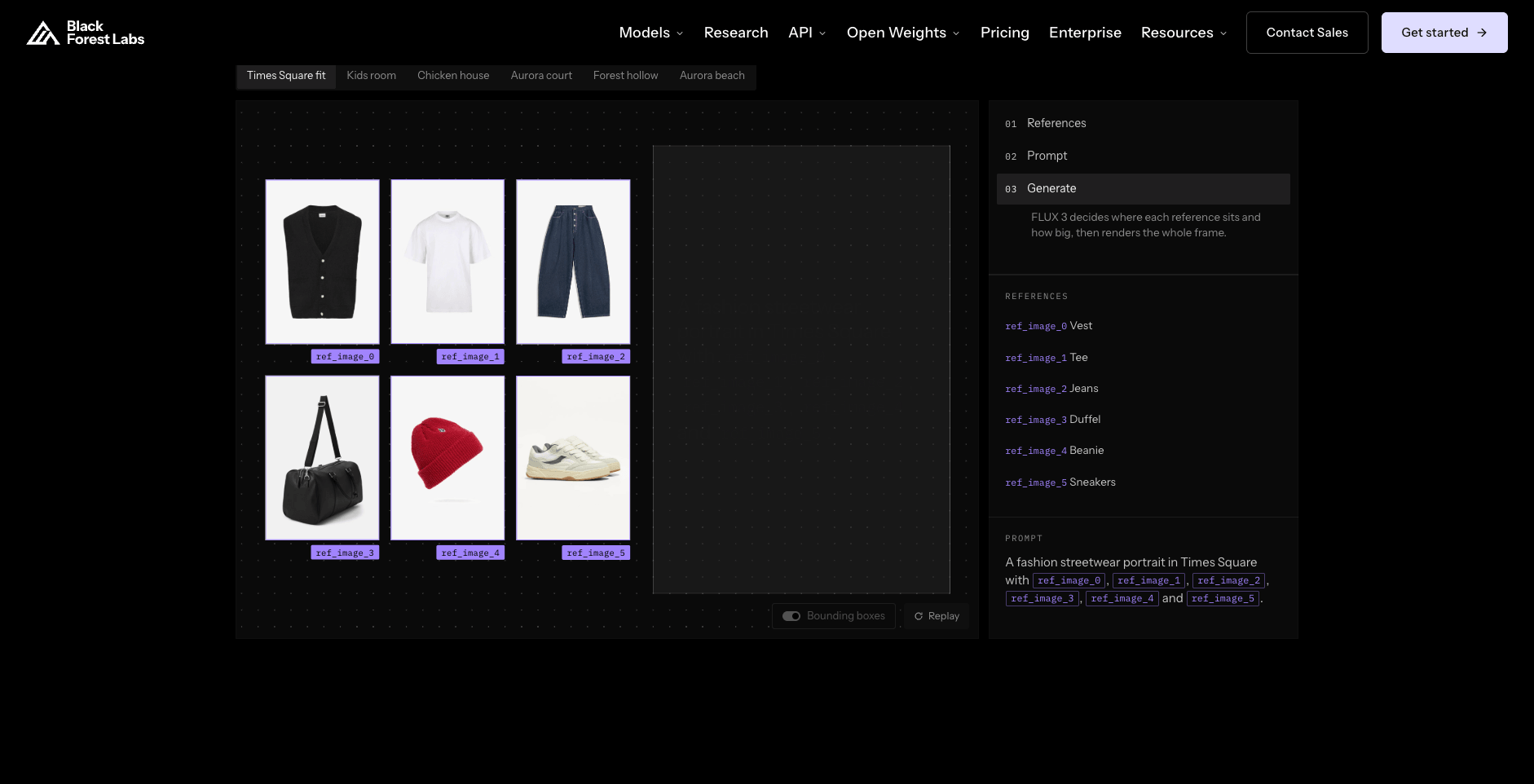
The official FLUX 3 Image model page on bfl.ai (accessed Oct 3, 2026).
Limits worth knowing
- Each reference must be at least 256×256 pixels and at most 16 megapixels; the reference count tops out at 10.
- Boxes guide placement but do not clip: elements are not hard-cropped at the boundary.
- "Pixels outside the edited boxes usually stay identical" is BFL's own documentation, not a contractual guarantee — check critical edits.
- BFL's quality claims around the FLUX 3 family come from its own preliminary, self-published evaluations during early access. Independent hands-on results will take time.
- Generated results must be downloaded within an hour of completion.
Bottom line
FLUX 3 Image turns multi-reference composition from "send a stack of images and hope" into a structured request: token-cited references for consistency, element tables when placement matters, and per-box edits that leave the rest of the frame alone. The multi-reference input itself arrived with FLUX.2; what is new here is layout control, 4K output, and an API shape built for programmatic composition. For character consistency across scenes, product shots in new contexts, or brand layouts with fixed composition, the documented workflow is straightforward — and the pricing runs from about four cents per image at draft resolution to sixty cents at 4K.
Transform Your Images with AI
Turn sketches into stunning images, remove backgrounds, swap faces, and more — all powered by AI.
Try Sketch To FreeShare
SketchTo Team
Tech writer covering AI tools, image processing, and creative workflows.
Related Articles

Do You Own Your AI Images? What the EU's Copyright Position Means for Creators
In the EU, content fully generated by AI is not protected by copyright. Here's what the 2026 European Parliament resolution, a Munich court ruling, and US/China positions mean for owning and selling AI images.
Jitish Kallat: Wind Study (Hilbert Curve)
Explore Google Arts & Culture’s interactive "Wind Study (Hilbert Curve)" by Jitish Kallat—how wind data and math make the invisible visible.
The new ChatGPT Images is here
OpenAI rolls out the new ChatGPT Images and GPT Image 1.5: faster generation, precise edits, better text rendering, and a new creation space.