
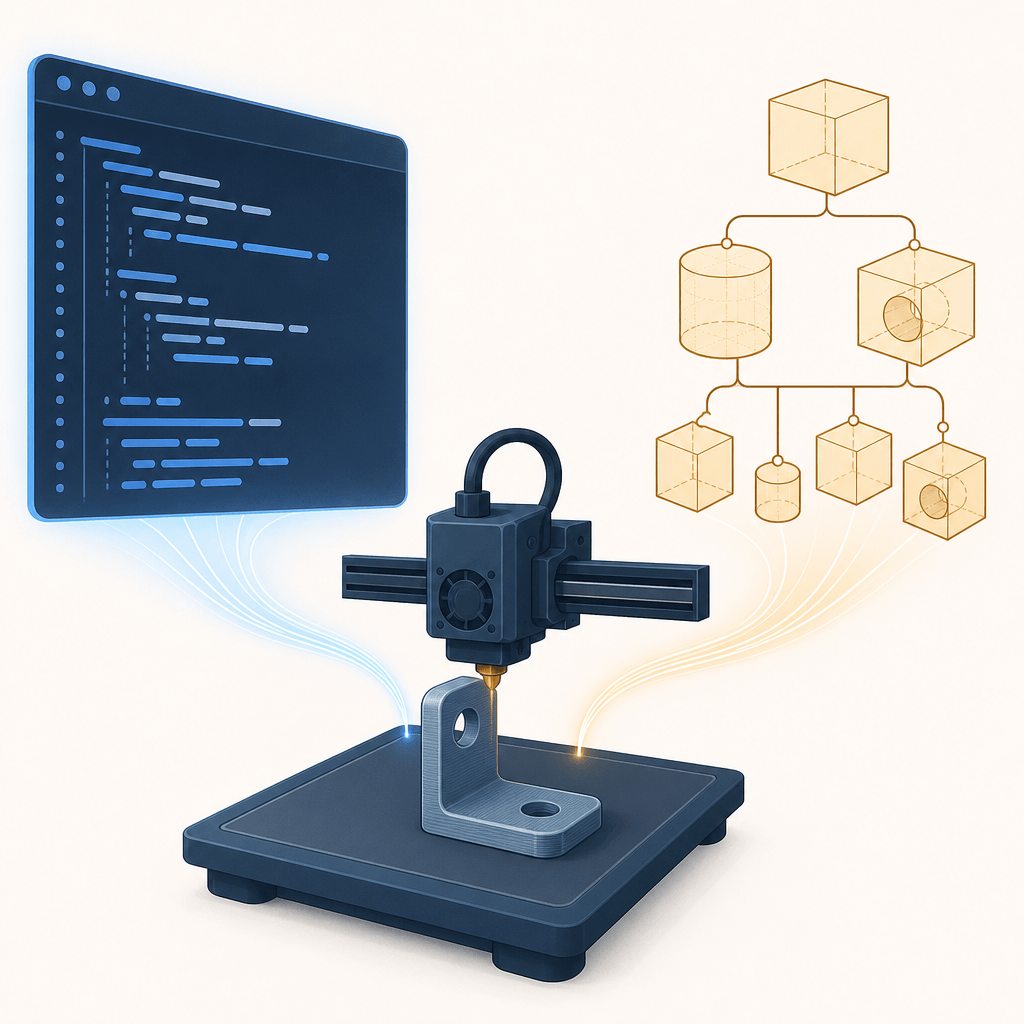
CadQuery vs OpenSCAD for AI-Generated Functional Parts
Both CadQuery and OpenSCAD can turn AI-written code into a correct, printable functional part — a controlled 2026 benchmark landed six for six. The tools differ in how they fail: CadQuery stops loudly and lets you interrogate its geometry, while OpenSCAD runs fast and quiet and can certify broken parts as clean. If you need AI to produce a part that fits, pick by task shape, and verify the exported mesh with numbers, not screenshots.
Key takeaways
- Six AI agents built three printable parts in both tools; every final part passed an independent mesh check, after 16 failures that the two tools reported very differently.
- CadQuery fails early and loudly; OpenSCAD fails silently and late. Silent success is the expensive failure in an unattended pipeline.
- Neither tool's own status output is trustworthy: both certified geometry that independent parsing proved broken.
- Task shape decides more than the tool: quick prismatic parts favored OpenSCAD, mating two-part assemblies favored CadQuery, and a real helical thread went to OpenSCAD outright.
- Renders caught almost nothing that mattered. Volume, interference, and assertions caught the print-ruining defects.
Two routes to an AI-made part
Ask an AI for "a bracket" and two very different things can come back. An image generator returns a picture of a bracket — often a convincing one, with plausible highlights and perfect shadows. Nothing in that image is a dimension. An image-to-3D model can go one step further and return a mesh, but a mesh that was never designed to a spec still has no trustworthy wall thickness, clearance, or thread profile.
Code-CAD is the other route. The model writes a script whose lines are dimensions, and the tool compiles that script into exact geometry. This is the route to choose when the part has a job to do: a hole that must accept a specific screw, two halves that must snap together, a thread that must engage. The HN discussion of the benchmark below put it well: useful parts need to be designed to spec, with a few measurements rippling through the whole design — not assembled to look right (discussion).
That distinction is also the honest boundary of the image lane. We build SketchTo, an AI image studio, so we will say it plainly: if you need a concept render of how a part or product should look, an image tool like SketchTo's sketch-to-render is the right lane. The moment the requirement is "this must fit that," you need code-CAD — and then the question becomes CadQuery or OpenSCAD.
Meet the two tools
OpenSCAD calls itself "The Programmers Solid 3D CAD Modeller." It is a script compiler: you describe the object in its own compact language, and it renders the result. Its two modeling techniques are constructive solid geometry (CSG) — intersecting, unioning, and subtracting primitive solids — and extrusion of 2D outlines. It exports STL and OFF, reads DXF for 2D profiles, and evaluates CSG with CGAL.
CadQuery is a Python library for building parametric 3D CAD models, designed to be used without a GUI. It sits on OCP, Python bindings for the open-source OpenCascade kernel — a boundary-representation (B-rep) kernel that knows where every face and edge is, not just a cloud of triangles. CadQuery exports STEP, AMF, and 3MF in addition to STL, and its documentation argues the case directly: standard Python, a kernel that natively supports NURBS, splines, surface sewing, STL repair, and STEP import/export, less code to express most parts, and faster builds than OpenSCAD.
Those are the vendors' claims. What happens when an AI agent actually drives each tool to a finished part?
What the benchmark did
ModelRift — a platform that generates OpenSCAD models from text — ran a controlled comparison in September 2026 (source). The setup:
- Six agents, three tasks, two tools. Each cell was a separate Claude Opus 5 agent running in Claude Code, with no cross-talk. Versions: CadQuery 2.8.0 on Python 3.14, OpenSCAD 2026.06.12.
- Equal skill files. The OpenSCAD skill and a ported CadQuery skill carried the same 3D-printing design rules — wall thickness, clearances, overhangs. The only asymmetry: the CadQuery file included an API cheatsheet, because the model already knows OpenSCAD syntax well.
- Three tasks of rising difficulty. T1: an L-bracket with gussets, countersunk holes, and fillets. T2: a two-part snap-fit enclosure for a 50 × 26 mm PCB, where the lid and box actually had to fit. T3: an M24×2 hose-barb adapter with a true helical thread — stacked rings explicitly banned.
- Independent verification. Every exported STL went through a parser that checks watertightness, volume, bounding box, non-manifold and boundary edges, flipped faces, and connected components. Neither tool's self-report counted.
The caveats are stated plainly in the source: one agent per cell (part of the spread is agent variance), the BOSL2 library was excluded (which would likely change OpenSCAD's T2 and T3 results), only construction was measured — not repair of someone else's broken model — and the runs predate a renderer fix to the visual feedback loop.
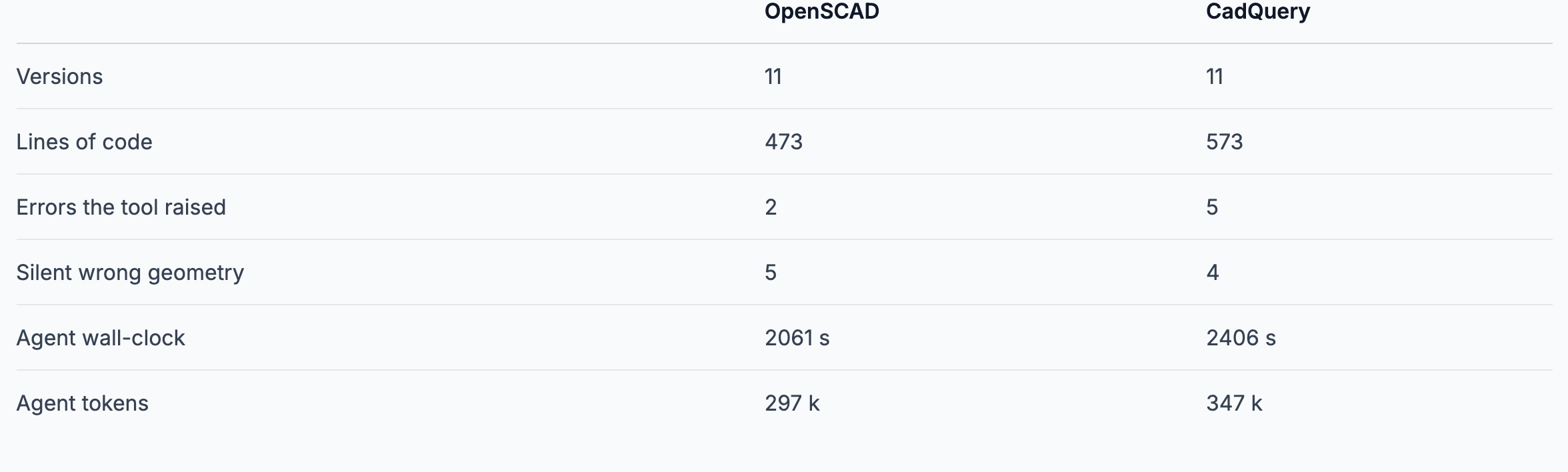
Benchmark totals across the three tasks. Source: ModelRift blog, modelrift.com (September 2026).
Results: six for six, and 16 failures on the way
All six final parts passed the independent mesh checks — watertight, single component, zero non-manifold edges. The comparison therefore comes down to the trip, and the trip cost 16 distinct failures, nine of which the tools never mentioned at all.
| Metric (3 tasks summed) | OpenSCAD | CadQuery |
|---|---|---|
| Versions needed | 11 | 11 |
| Lines of code | 473 | 573 |
| Errors the tool raised | 2 | 5 |
| Silent wrong geometry | 5 | 4 |
| Agent wall-clock | 2061 s | 2406 s |
| Agent tokens | 297 k | 347 k |
| Geometry recompute | 12–43 ms | 1.56–1.95 s |
Two rows deserve a second look. "Silent wrong geometry" is nearly tied — both tools produced parts that were wrong without saying so. And recompute speed, OpenSCAD's headline advantage at 30–100× faster, is noise inside an agent loop dominated by model inference; it would matter for a live customizer or a large parameter sweep, not for a one-shot generation run.
Mirror-image failure modes
The benchmark's most useful finding is that the tools fail in opposite ways.
CadQuery fails loudly and early. In T1, .fillet(3.0) died with BRep_API: command not done — a message that names neither the edge nor the radius. The agent had to bisect by hand to discover the cause: two R3 fillets do not fit in a 4 mm wall. Poor message, but a stopped build cannot ship by accident.
OpenSCAD fails silently and late. In T2 it reported no errors and no warnings across roughly 45 invocations while producing a part with four mounting posts deleted by a cavity subtraction, misplaced slots, and an export it had certified as clean that was actually corrupted. The Manifold backend returned Status: NoError for a mesh carrying four non-manifold edges and 60 zero-area triangles. For an unattended generation pipeline, that is the more expensive failure mode: silent success looks exactly like real success.
T3 is the emblem. OpenSCAD produced a true single-start helical thread correct on the first compile, in 43 ms, with no library — the agent wrote the helix as raw vertex-and-face arithmetic in a single polyhedron, with zero guardrails. CadQuery expressed the same geometry in about six readable lines using Wire.makeHelix and a swept profile, and that part worked first try too. Then the last line — the union of the threaded ridge onto the core cylinder — silently discarded the core, because the thread root sat at exact tangency with the core radius. The result looked perfect in renders, reported valid=True and solids=1, and had lost a third of its volume: 7065 mm³ where 10323 was expected. What caught it was a number.
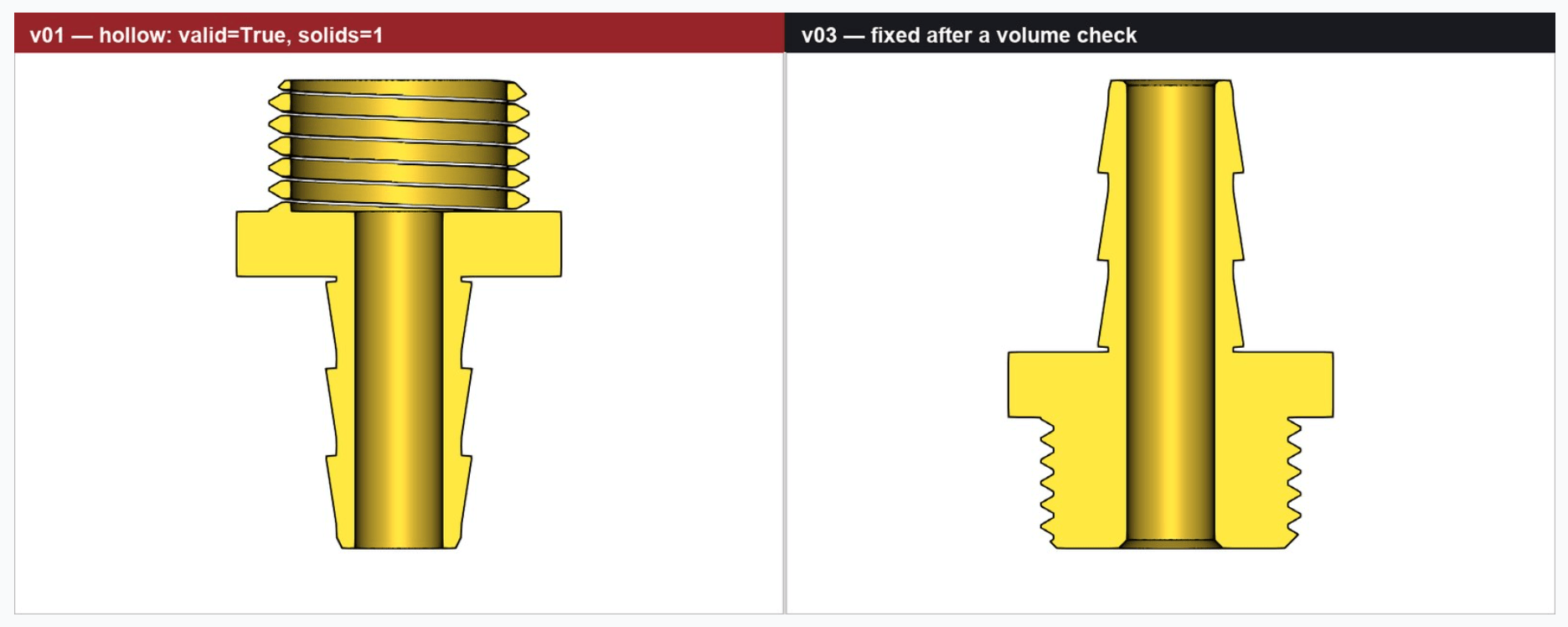
CadQuery T3, version 1: the union silently dropped the core, leaving floating thread turns. Source: ModelRift blog, modelrift.com.
The lesson cuts against both tools: neither self-report is the last word. The benchmark authors parsed every mesh themselves, and that discipline is what the "clean" column actually means.
Verification: what actually catches defects
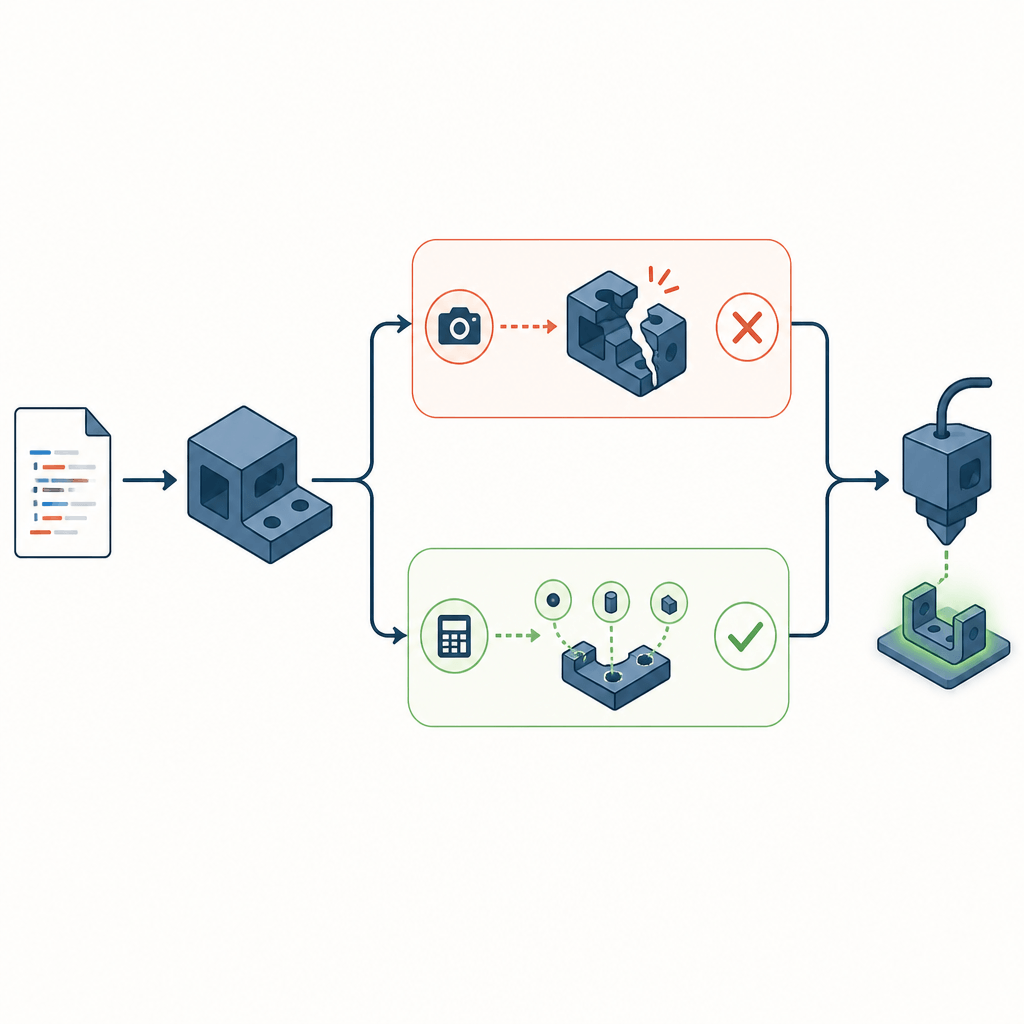
Across six runs, renders caught only coarse blunders — like four posts vanishing in a subtraction. Every defect that would have ruined a print was caught by a number: a volume, an angle, an interference test. In T3, the OpenSCAD agent nearly rejected correct geometry because a thread close-up looked wrong; its own note was that the render was insufficient evidence either way.
Here the two tools offer genuinely different affordances:
- CadQuery can be interrogated. The T1 agent read the countersink's half-angle directly off the B-rep to prove it was 90°, then wired assertions that re-run on every build — for example, asserting that box and lid volumes intersect by less than a threshold. When an assert fails, the build stops.
- OpenSCAD can only echo.
echo()prints numbers for someone to read; nothing stops the build. Both OpenSCAD agents independently wrote binary STL parsers — roughly as much code as the models themselves — to measure what they had built. It works, but it sees only the exported mesh, never the design.
Either way, the benchmark's prescription holds: force numeric checks — wall thickness, clearances, interference volume, overhang angle — and audit the exported mesh independently before printing. Preview and export are not the same thing.
Speed, formats, and ergonomics
OpenSCAD's case beyond the benchmark: 16 ms rebuilds, a compact text format an LLM writes directly, safe sandboxing, and no Python runtime to provision. Its built-in Customizer turns a parameter block into a settings UI for end users. Its structural limits: no geometry query, no STEP import, and renders that draw triangulation rather than part edges.
CadQuery's case: the Python ecosystem, B-rep precision, and interchange — starting from a real STEP file and adding parametric features is a workflow OpenSCAD cannot offer, since STL is lossy. In T2, CadQuery's derived dimension chain earned its keep: change the lip depth and the rim, plate, slots, and groove all move together, because each dimension is derived rather than typed twice. The trade-off is tooling — CadQuery has no Customizer equivalent, so the constants block is the entire parameter interface.
Note also that CadQuery's documentation claims faster builds than OpenSCAD, while the benchmark measured the opposite (1.9 s vs 16 ms recompute). The two are not measuring the same operation on the same parts — treat both as vendor/test-specific claims and benchmark your own workload if rebuild speed is decisive.
Which one should you pick
| Your task | Lean toward | Why |
|---|---|---|
| Quick single printable part, fast iteration | OpenSCAD | First-compile success on prismatic work, 16 ms rebuilds, minimal setup |
| Two parts that must fit, parametric variant families | CadQuery | Derived dimension chains, inline asserts, B-rep queries |
| STEP round-trip with real CAD packages | CadQuery | STEP import/export; STL is lossy |
| Threads, sweeps, unusual geometry | Either | OpenSCAD won T3 outright; CadQuery's version was cleaner code but needed the volume check to catch a silent boolean drop |
| Unattended AI generation pipeline | Either, with guardrails | Force numeric assertions; audit the exported mesh independently; treat tool status as unverified |
ModelRift itself is staying on OpenSCAD — compact format, sandboxing, and rendering speed outweigh a verification advantage they can add around the tool (their reasons). Your constraints may differ, but notice the shape of their decision: the tool choice mattered less than the verification loop they built around it.
The route rule
If the deliverable is a functional part, AI image generation is the wrong lane — no matter how good the render looks — and code-CAD is the right one. Inside code-CAD, let task shape pick the tool, then spend the effort where the benchmark found all the real defects: numeric assertions in the loop and an independent mesh audit on the export. The same image-versus-code split is playing out in UI generation; we covered that pattern separately in AI UI generation: two routes.
Render for the look. Code for the fit. Verify with numbers either way.
Transform Your Images with AI
Turn sketches into stunning images, remove backgrounds, swap faces, and more — all powered by AI.
Try Sketch To FreeShare
SketchTo Team
Tech writer covering AI tools, image processing, and creative workflows.
Related Articles
AI Game Art in 2026: What 85.8% Developer Adoption Actually Changes
A 2026 CESA survey reports 85.8% of Japanese game developers using generative AI. What that number actually covers, where AI image generation fits in game art production, and a starter workflow for solo developers.

Midjourney's V8.2 Edit Model: Which Editing Mode Should You Use?
Midjourney's V8.2 edit model unifies instruction edits, inpainting, outpainting, up-to-4-image reference, and moodboards in one place. Here's how to pick the right mode for each kind of edit.

From Sketch to Photoreal: FLUX.2 and the New AI Sketch Workflow
A deep guide to sketch↔image workflows with FLUX.2: multi-reference, 4MP editing, prompt control, evaluation, and practical recipes.