GTA 6 ChatGPT Prompts: 7 Copy-Paste Photo Templates & Gemini Steps
To write a reliable GTA ChatGPT prompt for turning your own photo into Grand Theft Auto VI–inspired cover art, pack five specific instructions into one message: anchor your face to the uploaded photo, describe the painted cel-shaded art style instead of relying on brand names, set the tropical sunset or neon lighting, state the aspect ratio, and exclude stray text or logos.
Demand for GTA-style AI portraits jumped around Rockstar Games' worldwide launch of Grand Theft Auto VI on November 19, 2026 for PlayStation 5 and Xbox Series X|S, putting Vice City and the state of Leonida back across social feeds. Many short prompt lists skip facial-identity locks or tell readers to request official game titles that can trigger safety filters.
Note: The ChatGPT and Google Gemini steps below are based on OpenAI and Google's official image-editing documentation rather than first-party hands-on chat runs. This is an independent guide with no affiliation to Rockstar Games or Take-Two Interactive and uses no official game artwork.
How a Reliable GTA 6 Photo Prompt Is Built
A clear ChatGPT GTA 6 style prompt separates what the model should preserve from what it should restyle. Rather than typing "make my photo look like GTA 6," organize your prompt around five explicit parts—aligning with Google DeepMind's Nano Banana prompt guide (Style, Subject, Setting, Action, and Composition) and OpenAI's Images in ChatGPT workflow:
- Identity anchor: Instruct the model to use your uploaded image as the strict subject reference and preserve facial structure, skin tone, hairstyle, and expression (or a pet's coat markings).
- Visual rendering mechanics: Describe the art technique directly—semi-realistic digital illustration, crisp black ink outlines, smooth painted cel-shading, and high-contrast rim light—instead of depending on trademarked franchise names.
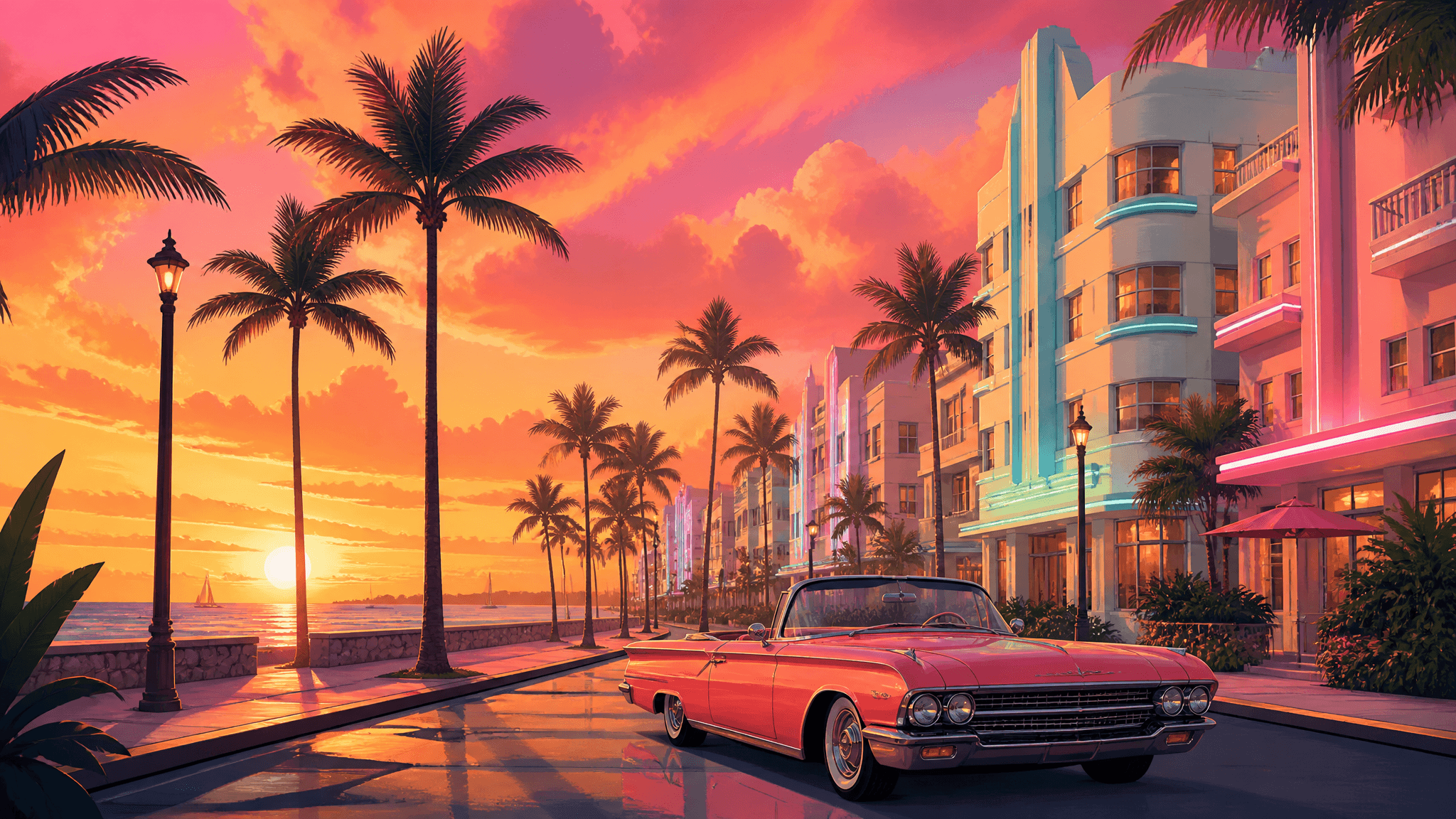
- Color palette and lighting: Define the mood explicitly. Warm coral, pastel pink, golden amber, and turquoise evoke a coastal Leonida sunset; hot pink, electric cyan, and deep violet on wet asphalt create a 1980s Vice City night scene.
- Setting, pose, and wardrobe: Choose a concrete backdrop (beachfront boulevard, Art Deco hotel strip, coastal overpass) and everyday streetwear rather than weapons or violent props.
- Aspect ratio and clean-frame rules: State your target frame up front (
1:1,4:5,9:16, or16:9) and end withNo text, no readable signs, no logos, and no watermarksto discourage unwanted fake titles.
7 Copy-Paste GTA 6 ChatGPT Prompts (Ready for Gemini Too)
Every template below is structured for uploading a photo in ChatGPT Images or Google Gemini. Replace any text inside [BRACKETS] to match your outfit, setting, or aspect ratio before sending.
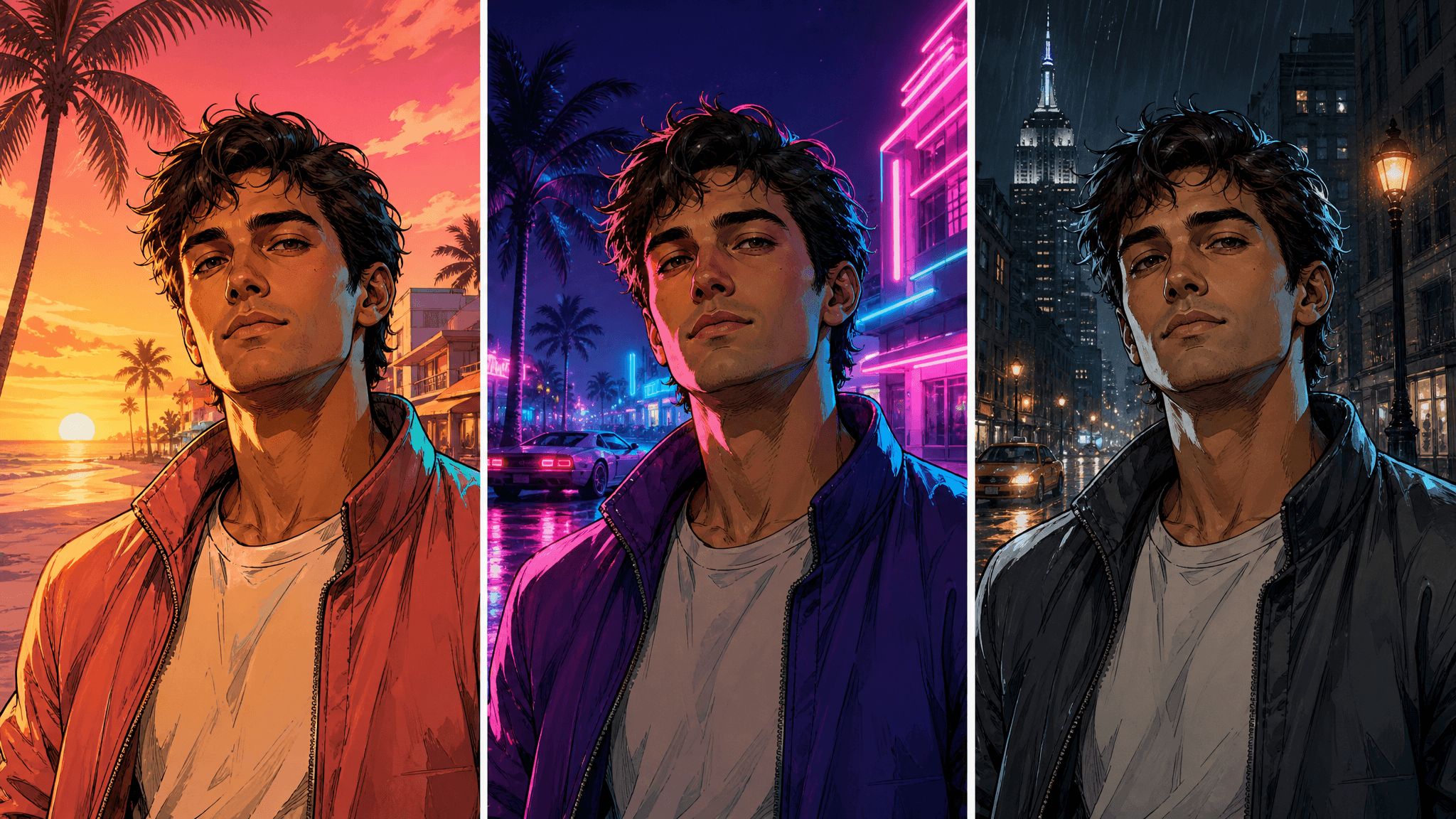
Illustrative style reference showing the three core lighting palettes in the templates above (not a ChatGPT or Gemini test screenshot).
1. GTA 6 Leonida Coastal Sunset Portrait
Choose this template for the warm tropical sunset look associated with Leonida promotional art. It anchors facial details to your upload while specifying coral, golden amber, and turquoise rim lighting against a beachfront backdrop.
Using my uploaded photo as the strict subject reference, transform the
person into a polished semi-realistic open-world video-game cover
illustration inspired by a tropical coastal city at sunset. Keep the
person's exact facial structure, eye shape, skin tone, hairstyle, and
natural expression recognizable without replacing or genericizing the
face. Dress them in [OUTFIT: e.g., an open pastel camp-collar shirt over
a white tee and sunglasses tucked into the collar]. Render with crisp
black ink outlines, smooth painted cel-shading, warm coral, golden
amber, and turquoise rim highlights, and rich contrast. Set the
background on a sun-drenched beachfront boulevard with silhouetted palm
trees, distant pastel Art Deco hotels, and a glowing pink-orange sunset
sky. [COMPOSITION: medium close-up portrait from the chest up], [ASPECT
RATIO: 4:5 vertical for Instagram feed | 1:1 square | 9:16 vertical]. No
text, no game titles, no logos, and no watermarks.
2. 1980s Vice City Neon Night Street
Use this nighttime variation for saturated retro magenta-and-cyan reflections. Because dark backdrops shift skin tones heavily, the prompt spells out both neon rim colors and wet pavement highlights.
Transform the person in my uploaded photo into a 1980s retro coastal
game-cover illustration at night. Preserve their recognizable facial
features, face shape, skin tone, hairstyle, and expression from the
reference image. Style them in [OUTFIT: e.g., a lightweight vintage
windbreaker or linen blazer over a dark tee] with a confident, relaxed
posture. Render in bold graphic digital illustration with sharp dark ink
outlines, clean cel-shaded shadows, and saturated hot pink, electric
cyan, and deep violet neon lighting reflecting off their shoulders and
hair. Place them along a palm-lined coastal strip at night with classic
1980s skyline silhouettes, glowing pastel storefront reflections on damp
pavement, and soft atmospheric haze. [COMPOSITION: waist-up
three-quarter portrait], [ASPECT RATIO: 4:5 vertical | 9:16 vertical].
No readable text on signs, no logos, and no watermarks.
3. Clean Loading-Screen Character Card (Profile Avatars)
This template removes crowded street scenery so the portrait stays legible at small avatar sizes for Discord, Twitch, YouTube, or console profiles.
Reimagine the subject in my uploaded photo as a dramatic close-up
video-game loading-screen character illustration. Keep the person's
facial identity, hair, skin tone, and expression closely aligned with
the uploaded photo. Render with confident thick black ink outlines,
stylized flat painted cel-shading, strong directional rim light, and
crisp graphic contrast. Dress them in [OUTFIT: e.g., a structured denim
jacket and casual hoodie]. Replace the background with a clean warm
tropical sunset gradient in coral, mango orange, and violet framed by
minimal palm-leaf silhouettes and subtle geometric color blocks so the
portrait stays readable at small sizes. [COMPOSITION: head-and-shoulders
close-up], [ASPECT RATIO: 1:1 square for profile picture | 4:5
vertical]. No text, no character names, no logos, and no watermarks.
4. Couple or Duo Sunset Boulevard Shot
For two-person photos, Google DeepMind's prompt guide advises giving each character a distinct label to help maintain subject consistency. This prompt separates the left and right subjects before defining the shared coastal backdrop.
Using my uploaded photo as the reference, transform both people into a
cohesive semi-realistic tropical game-poster illustration. Keep both
faces, hairstyles, skin tones, heights, and expressions strictly
recognizable: preserve the person on the left ([LEFT SUBJECT DETAIL:
e.g., wearing a coral linen shirt]) and the person on the right ([RIGHT
SUBJECT DETAIL: e.g., wearing a cropped denim jacket and gold hoops])
without swapping or blending their features. Render both figures with
crisp black ink outlines, smooth painted cel-shading, and warm
golden-hour rim light. Frame them standing side by side along a coastal
boardwalk overlooking turquoise water, palm silhouettes, and pastel
high-rises under a pink-and-amber dusk sky. [COMPOSITION: waist-up duo
portrait with clear separation between both faces], [ASPECT RATIO: 4:5
vertical | 16:9 widescreen]. No text, no logos, and no watermarks.
5. Car or Motorcycle Cover-Art Portrait
This prompt frames a person beside a vehicle at a slight low angle. It specifies a medium-full shot rather than a distant wide shot so facial details still occupy enough of the frame.
Transform my uploaded photo into a cinematic open-world game promotional
illustration featuring the subject beside [VEHICLE: e.g., a glossy
vintage convertible sports car | a matte-black street motorcycle]. Keep
the person's facial features, hair, skin tone, and likeness faithful to
the uploaded reference photo. Pose them [POSE: e.g., leaning casually
against the fender with arms folded] wearing [OUTFIT: e.g., clean summer
streetwear and sneakers]. Render in polished semi-realistic digital
illustration with crisp ink outlines, smooth painted highlights on the
vehicle bodywork, and bold cel-shaded shadows. Set the scene on a sunlit
coastal causeway overlooking palm trees and a distant pastel city
skyline at golden hour. [COMPOSITION: medium-full shot from a slightly
low camera angle], [ASPECT RATIO: 4:5 vertical | 9:16 vertical]. No
license plate text, no brand emblems, no logos, and no watermarks.
6. Pet Protagonist Coastal Illustration
Pet photos require breed-specific anchor words—this template specifies fur pattern, coat markings, ear shape, and expression instead of human facial cues.
Transform the pet in my uploaded photo into a charismatic open-world
tropical video-game cover illustration. Strictly preserve the pet's
exact breed appearance, fur color pattern, coat markings, ear shape,
eyes, and expression from the reference photo. Optionally add
[ACCESSORY: e.g., stylish retro tinted sunglasses resting on its snout |
a bright woven bandana—or remove this phrase for no accessories]. Render
in crisp semi-realistic digital painting with bold black ink outlines,
smooth cel-shaded fur highlights, and warm coral-and-amber sunset rim
lighting. Place the pet in front of a breezy tropical beachfront
promenade with silhouetted palm trees, turquoise ocean highlights, and
pastel sunset clouds. [COMPOSITION: eye-level portrait centered in the
frame], [ASPECT RATIO: 1:1 square | 4:5 vertical]. No text, no logos,
and no watermarks.
7. Rainy East Coast Noir Skyline Portrait
When tropical pastels clash with dark coats or nighttime photos, switch to this desaturated steel-blue and sodium-amber skyline style instead.
Transform the person in my uploaded photo into a gritty East Coast noir
open-world game cover illustration. Preserve the person's facial
identity, bone structure, hair, and expression from the reference photo.
Keep their outfit as [OUTFIT: e.g., a dark wool overcoat or leather
jacket]. Render with sharp black ink outlines, deep cel-shaded shadows,
moody desaturated steel-blue, charcoal, and warm sodium-streetlight
amber highlights. Place them on a rain-slicked downtown street at night
with blurred high-rise skyline silhouettes, glowing wet asphalt
reflections, and light rain streaks in the air. [COMPOSITION: chest-up
three-quarter portrait], [ASPECT RATIO: 4:5 vertical | 16:9 widescreen].
No text, no street signs, no logos, and no watermarks.
Step-by-Step Workflow in ChatGPT Images and Google Gemini
Both platforms let you upload a reference photo and refine the output conversationally, though their current editing tools and model tiers differ.
Using ChatGPT Images (Web, Desktop, and Mobile)
According to OpenAI's Images in ChatGPT Help Center guide, ChatGPT Images (including ChatGPT Images 2.6) is available across the web, desktop, iOS, and Android apps on all ChatGPT plans in supported regions (Enterprise and Edu access depends on workspace permissions):
- Open a chat or the Images tab: Start a regular chat or select Images from the sidebar (check Explore if it is not visible).
- Upload one clear photo and send your prompt: Attach your portrait, paste a template with bracketed details filled in, and submit.
- Make targeted follow-up edits:
- Web: Open the generated image (enter full view if needed), select Comment, click the spot to adjust (for example, jacket color or sky lighting), describe the edit, and send.
- iOS or Android: Open the image, tap Edit to place comments, or select Remove with the brush slider to erase an unwanted object without typing a prompt.
- Aspect ratio: Select Resize and pick a different framing ratio.
- Reuse a portrait across chats (optional): With Memory enabled outside Temporary Chat, OpenAI documents that you can save an uploaded photo as a named reference (such as
Alex) and call it in later chats by typing@Alex. - Plan limits: Generation caps depend on your ChatGPT plan; when reached, ChatGPT shows when you can try again.
Using Google Gemini (Nano Banana Models)
Per Google's Gemini Apps image generation and editing guide, Gemini runs image creation and editing on its Nano Banana model family:
- Avoid Flash-Lite for photo edits: Before uploading, check your selected model. Google states that Nano Banana Lite (selected when Gemini is set to Flash-Lite) is optimized for speed and is not designed for multiple reference images or multiple edits. Select Flash or Pro (Nano Banana 2) for iterative photo editing and multi-image references.
- Upload and submit: Open
gemini.google.comor the Gemini app, go to Images in the sidebar or attach your photo in chat, paste one template from above, and send. - Refine in chat or Library: Request one adjustment at a time in the same thread—or open Library in the sidebar, select the image, and click Chat underneath to edit it.
- Regenerate with Nano Banana Pro when available: On eligible Google AI plans, click More → Redo with Pro below a generated image to rerun it with Nano Banana Pro for finer detail and consistency.
- Account eligibility: Personal Google Accounts require users to be 18 or older to generate and edit images (13+ for text-only generation).
Fixing Common Prompt Failures (Without Starting Over)
Sending one targeted follow-up edit matches both platforms' documented iterative workflows better than rewriting an entire prompt. Start from a clear, evenly lit front or three-quarter photo (Google DeepMind's prompt guide recommends clear reference images for subject consistency).
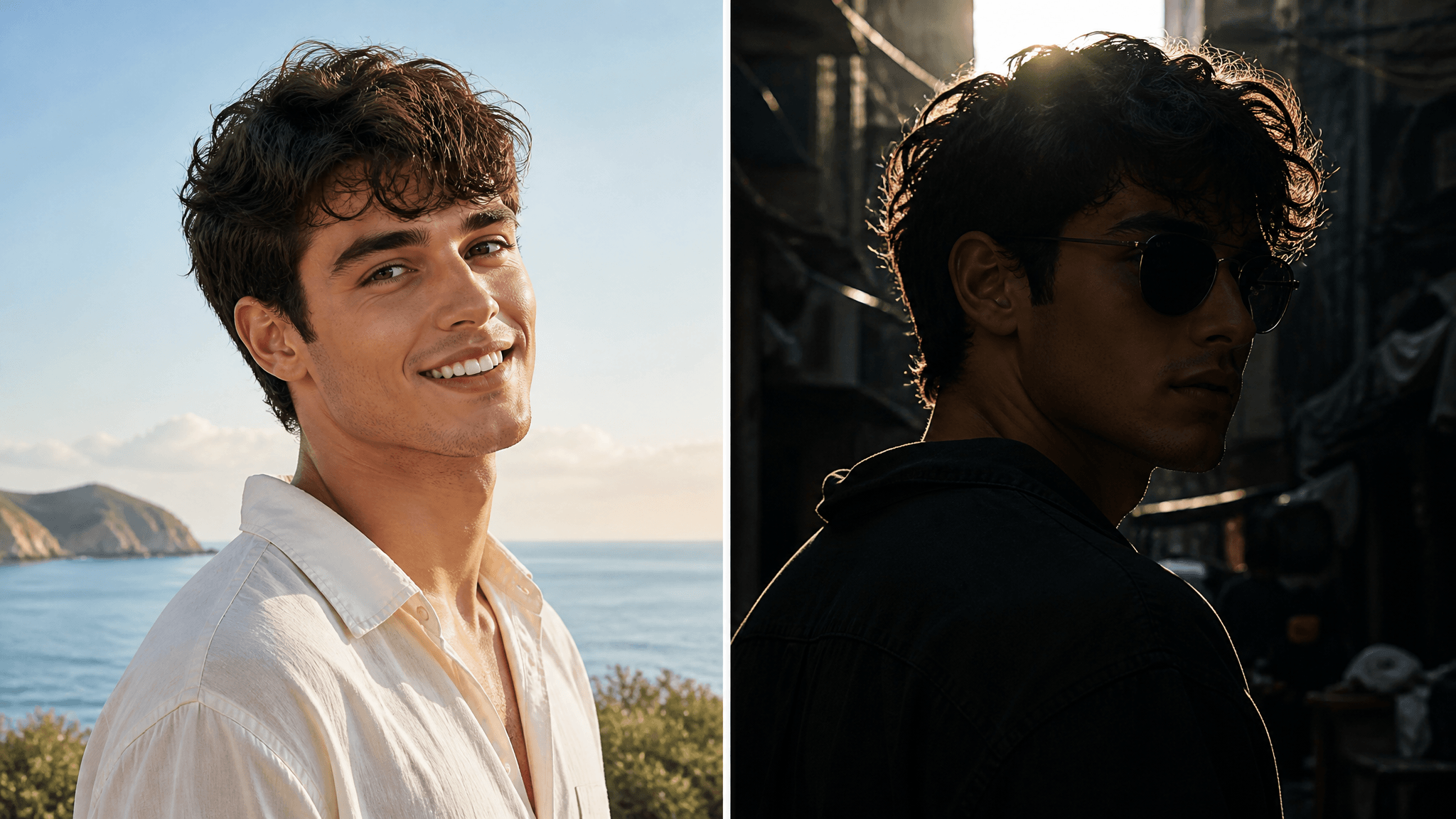
Illustrative source-photo reference: even front or three-quarter lighting (left) keeps facial features clearer than heavy shadows and cluttered backdrops (right).
| Problem | Platform Basis or Prompt Cause | How to Fix It |
|---|---|---|
| Face drifts or changes after a small edit | Documented behavior: OpenAI's Help Center notes that edits "may extend beyond the area you select." In Gemini, Flash-Lite (Nano Banana Lite) is not designed for multi-turn edits. |
Start with a sharper, evenly lit reference photo; move Gemini off Flash-Lite; if an edit alters your face, step back to the original upload rather than layering edits on a drifted image. |
| Request refused or blocked by safety filters | Documented behavior: OpenAI's ChatGPT Images 2.5 System Card describes upstream LLM prompt checks plus downstream multimodal checks on both uploaded images and outputs. OpenAI's Usage Policies (effective Nov 20, 2026) and 4o image safety notes restrict IP infringement, unauthorized likeness use, and heightened real-person violence or nudity risks. | Remove game titles, studio names, logos, and weapons or crime props; describe visual art mechanics instead (as in the 7 templates above) and only upload photos you have consent to edit. |
| Looks like a flat children's cartoon | Prompt heuristic: DeepMind's prompt guide advises naming the exact visual medium instead of leaving style broad; generic terms like "cartoon" leave line weight and shading underspecified. | Replace "cartoon" with semi-realistic digital illustration, crisp black ink outlines, smooth painted cel-shading, high-contrast sunset rim light. |
| Random garbled street signs or fake logos | Documented limitation: OpenAI lists dense small text among known image-generation limitations, and unconstrained city signage invites random lettering. | End your prompt with no text, no readable signs, no logos, and no watermarks. When you intentionally want one short word on a sign, put it in double quotes per DeepMind's prompt guide. |
| Wrong crop for Instagram, Discord, or wallpaper | Documented limitation & prompt heuristic: unspecified dimensions leave framing to defaults, and OpenAI lists cropping among known edge cases. | Declare the aspect ratio inside the prompt (1:1, 4:5, 9:16, or 16:9), or use ChatGPT's Resize control after generating. |
If the lighting and backdrop look right but one element needs a follow-up pass, send a focused correction in chat:
Keep the exact lighting, palm-lined sunset background, and painted
cel-shaded style, but bring the face shape, eyes, hairstyle, and
expression closer to my original uploaded photo. Do not add any text or
logos.
Keep the person's face, pose, and outfit unchanged. Remove all readable
text from background signs and shift the lighting toward warmer coral,
golden amber, and pastel turquoise sunset tones with sharper black ink
outlines.
Skip Manual Prompting With SketchTo's AI GTA Filter
If you prefer picking a preset style over writing and iterating long prompts in chat, try the AI GTA Filter—a browser tool built on SketchTo that turns a single photo into GTA-inspired game-cover art with upfront per-image credit pricing.
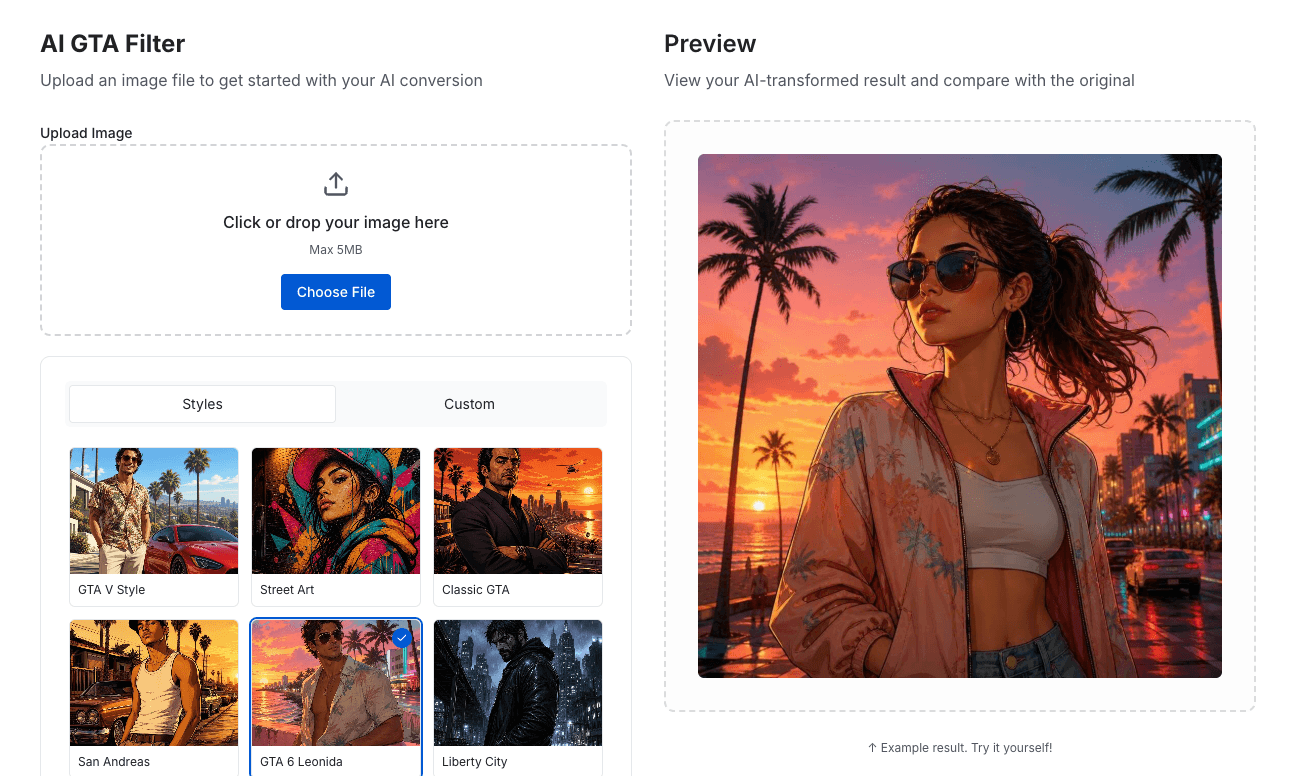
SketchTo's browser-based AI GTA Filter editor at sketchto.com/tool/ai-gta-filter showing photo upload, Styles presets (GTA 6 Leonida default), Custom tab, and preview.
Upload one JPEG, PNG, or WebP photo (up to 5MB) and keep the default GTA 6 Leonida style on the Styles tab, or switch across eight additional built-in presets (Vice City Neon, Classic GTA, GTA V Style, San Andreas, Liberty City, Loading Screen, Wanted Poster, and Street Art). You can also set an aspect ratio (Match input, 1:1, 9:16, or 16:9), download a PNG saved in private History, or open the Custom tab (up to 3,000 characters; switching to Custom clears the active preset) if you want to paste one of the templates above.
How the two paths compare:
- ChatGPT or Gemini prompting fits best when you already use those apps and want conversational, spot-by-spot iteration (such as ChatGPT's web Comment tool or Gemini's Library chat) inside your existing chat plan.
- SketchTo's AI GTA Filter fits best when you want preset styling and selectable image models in one browser editor—defaulting to Nano Banana at 2 credits per image, alongside eight other models showing upfront credit costs before generation (including FLUX 2 Pro at 2–3 credits, GPT Image 2 at 3–7 credits up to 4K, and Nano Banana 2 at 4–8 credits up to 4K). Google or GitHub sign-in is required, new accounts receive free starter credits, full-frame AI redraws can still shift small accessories like glasses or jewelry, and SketchTo's Basic plan covers personal use while Pro includes a commercial license (subject to third-party trademark rules).
Sharing, Provenance, and Trademark Boundaries
Before sharing or using a GTA-inspired AI portrait commercially, keep three practical rules in mind:
- Descriptive style vs. trademarked IP: Grand Theft Auto and GTA are trademarks of Rockstar Games and Take-Two Interactive. Styling a personal portrait with coastal neon lighting and inked cel-shading is separate from selling merchandise or ads featuring official logos, game titles, or characters—leave official marks out of prompts and commercial artwork.
- Consent for someone else's photo: Both OpenAI's and Google's platform rules prohibit unauthorized misuse of another person's likeness; get permission before uploading and editing photos of friends, clients, or public figures.
- Built-in AI provenance markers: ChatGPT outputs carry C2PA provenance metadata and Gemini Nano Banana outputs include a SynthID watermark. Keep those transparency markers intact when posting AI-stylized portraits.
Pick the template that best fits your source photo's lighting, fill in the bracketed wardrobe and aspect-ratio fields, and adjust one detail at a time—or use a preset browser tool when you want the tropical game-cover style without manual prompt drafting.
Transform Your Images with AI
Turn sketches into stunning images, remove backgrounds, swap faces, and more — all powered by AI.
Try Sketch To FreeShare
SketchTo Team
Tech writer covering AI tools, image processing, and creative workflows.
Related Articles
Sheru Bhai Prompt: How to Make Your Own Photo With the Lion
Copy-paste Sheru Bhai prompts: one character block, three scene recipes, the step-by-step flow, and fixes for a drifting face and melted paws.
MOSS-Image Edit in ComfyUI: The Documented Setup
MOSS-Image has no image input, so instruction editing comes from a community edit LoRA. The documented files, edit_format values, and settings for ComfyUI.
Reverse Engineering Prompt: What It Is and How to Do It
Reverse engineering a prompt means inferring the prompt behind an AI output. Learn the documented method researchers use, a manual checklist you can apply today, and where the technique breaks down.